Order the records. Reduce the liens. Stop chasing the clinic.
Your firm orders medical records, itemised bills, balances, payoffs and affidavits from one portal — and negotiates reductions on the same ledger the clinic reads. Every ask has a status, an owner and a clock, so “where is that chart?” finally has an answer.
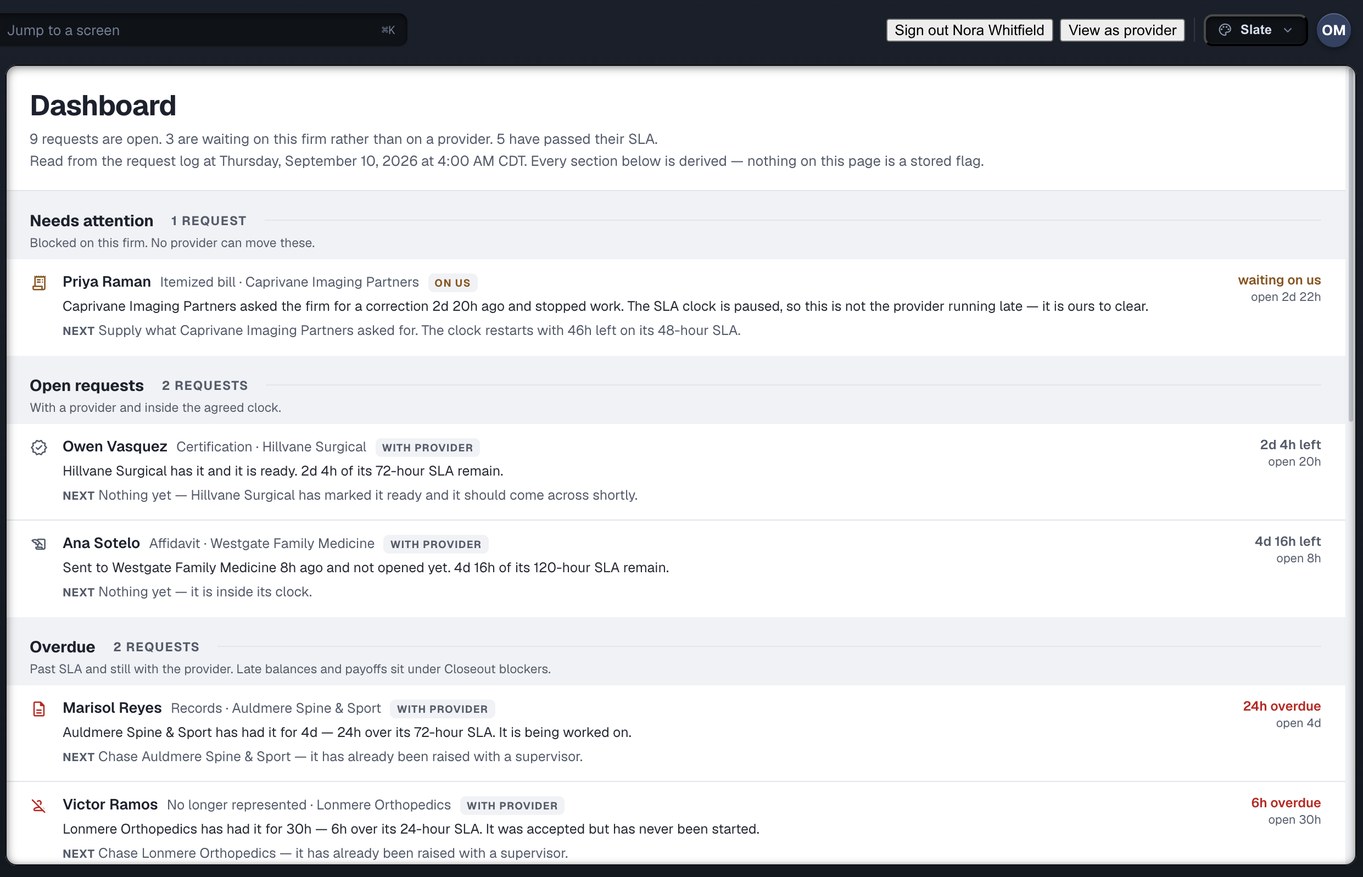
Captured from the running build, 24 September 2026. Demonstration data — every name, matter and figure is a fixture, not a real client, clinic or balance.
The work between the clinic and the demand
Six things your firm asks a medical provider for, every week, in email threads that have no status and no owner. Here each one is an object with a clock.
Medical Records Requests
All thirteen asks — records, itemised bills, billing ledgers, balances, final balances, payoffs, affidavits, certifications, status updates, NLR and MedPay/PIP — raise from one builder, itemised rather than described.
Learn more → LRLien Resolution & Reductions
Liens asserted against the recovery, and every reduction you have asked for with the basis you stated. Offers, counters and acceptances are kept — and the clinic sees your stated reason word for word.
Learn more → BBBills, Balances & Payoffs
Billed, paid, adjusted, reduced and outstanding — per matter and per provider, on one ledger derived from the request log rather than stored. Exact to the cent, with no rounding anywhere.
Learn more → ECThe Exception Center
Everything wrong across the firm in one ranked list — by what it costs and what it blocks, not by age. A late request that is also missing its bill is one row, with both facts on it.
Learn more → MTMass Tort Bulk Ordering
Hundreds of requests at once, with the total cost to the cent and every blocker shown before you commit. Duplicates are graded rather than guessed, and Approve refuses while any row is unanswered.
Learn more → PDProvider Discovery
Find a clinic, or find where a client treated — and know whether an order will actually arrive before you send it. What it costs, how long that clinic takes, and whether anyone has had trouble before.
Browse the directory →A thread is not a system of record
Most firms run this on twelve shared inboxes and a phone tree. An email thread has no status, no owner, no clock and no history — so when the paralegal who sent it is on holiday, the only escalation available is to send the same email again.
Injury Docs turns each of those asks into an object both sides can read. Same request, same clock, same ledger — on your screen and on the clinic’s.
Create your firm accountWhat is actually built, counted from the build
These are facts about the product, not customer outcomes. Injury Docs is new and has no settlement figures to quote — we would rather print none than print a guess.
One record, read from four chairs
The signed-in organisation’s kind decides which rail mounts. A law firm raises the request and owns the record; the clinic works it; a partner holds a grant scoped to one request; the injured person has no account, and is told so plainly. Every page below is written for the person actually doing that job.
Law firms
Six desks read one record: attorneys, case managers, records specialists, settlement and accounting, owners and administrators, and mass tort at volume.
Read the page → MPMedical providers
A work queue, not a shop window. Four clinic desks: records custodians, billing and balances, practice owners and office managers, clinicians and the front desk.
Read the page → PNPartners
Everyone who touches a matter and is neither side. Outside custodians, release-of-information vendors and experts hold a grant, not a login.
Read the page → IPInjured people
There is nothing here for you to open, and we are not going to pretend otherwise. What actually happens between your lawyer and your clinic.
Read the page →Thirty-seven roles across the four families, and every one of them is covered by a page. See every role →
Order and track everything in one portal
Your firm places every order in one place — records, bills, balances, payoffs, affidavits, referrals and reductions — and follows each one to fulfilment. The clinic works the same request from the other side.
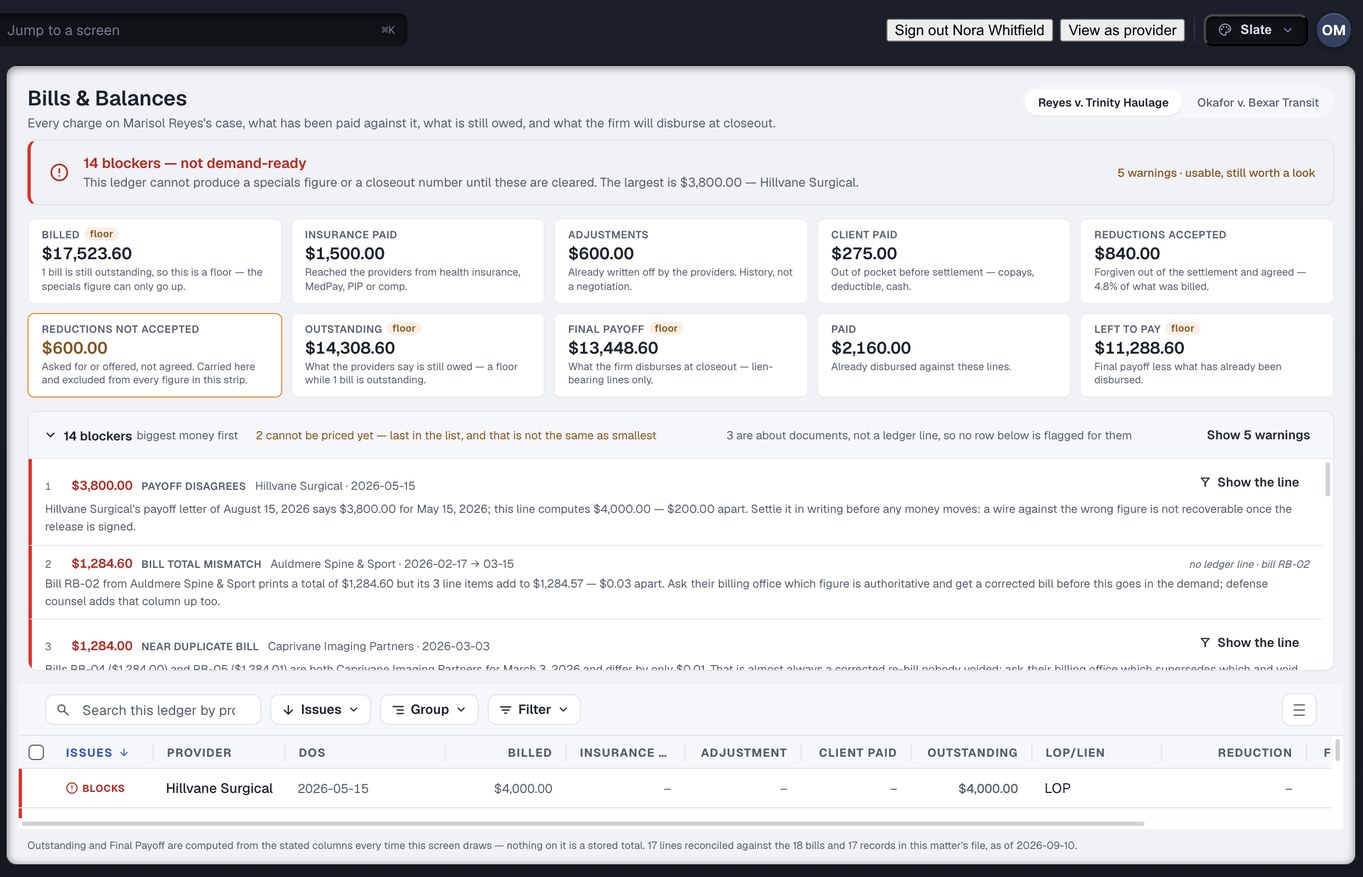
The clinic sees this same derivation — including the amount you removed and the reason you stated, word for word.
Captured from the running build, 24 September 2026. Demonstration data — every name, matter and figure is a fixture, not a real client, clinic or balance.
From account to fulfilled
Create your firm account
Sign up with your firm details. Your people, your desks and your agreed clocks are set up once, in Settings.
Find the clinic
Search the directory for where your client treated. Four reachability answers tell you whether an order will actually arrive — before you send it.
Raise the request
Pick the ask, tick the materials, attach the authorisation. Presets fill the materials in one click and you can change every tick before it goes.
Track, reconcile, reduce
Watch the state move, collect what arrives, reconcile the bill and ask for the reduction — on the ledger the clinic reads too.
Where is the Reyes chart? Today that does not have a slow answer — it has no answer. Somebody opens an email thread and reads it.
The problem Injury Docs was built to end — from our own walkthrough of how PI firms run records today, 11 September 2026.
Notes for plaintiff firms
The thirteen things you ask a clinic for — and which one has a screen
A walkthrough of every records and billing ask a PI firm makes, and why twelve of them are a shared inbox.
ArticleWhy “all records” is the most expensive phrase in your request
An itemised materials list beats a paragraph, because it never means one thing to you and another to the custodian.
PlaybookRecording the basis: how reduction asks survive the file review
Every offer, counter and acceptance kept with the reason you gave — and shown to the clinic verbatim.
Every ask on one clock. Every dollar on one ledger.
Create your firm account and order records, bills, balances, payoffs and affidavits — then run your reductions on the same ledger the clinic reads.
Are you a clinic? Read the provider side →