Thirteen asks, one object with a clock.
Records, itemised bills, billing ledgers, balances, final balances, payoffs, affidavits, certifications, status updates, NLR and MedPay/PIP — raised from one builder, carried on one state machine, and read by the clinic on the same record you read.
One builder, one state machine, one place to look
Everything a paralegal does all day is the same shape: ask a clinic for something, and find out later whether it came. So there is one Request here, and the named asks are types of it — riding one state machine, one clock and one audit trail. Bills, payoffs and liens are not separate features. They are the same object with a different type.
What one object buys you
- One Requests screen holds every ask your firm has ever made, and where each one is.
- One reporting surface, because there is one object to report on.
- An ask can be escalated, reassigned and handed over. An email thread cannot.
- Fifteen actions are available on a request — escalate, reassign, correct, cancel and the rest — each one written to the log.
What is on the builder today
Eleven of the thirteen raise from the builder now. The remaining two are declared rather than improvised, so their identifiers never change when they arrive.
Later types are already named for the same reason: imaging, DICOM, radiology report, lien, release, referral, LOP, expert, reduction and settlement payment.
The request carries a list, not a paragraph
The defect is born in the free-text box. “All records” means the whole chart to one custodian and the last visit to another; “billing” means an itemised statement to one and a UB-04 to another. The clinic fulfils what they read, you get something you cannot use, and nobody finds out for three weeks.
One sentence, two readers, three weeks. What arrives is whatever the custodian decided it meant, and the disagreement only surfaces when the demand is being drafted.
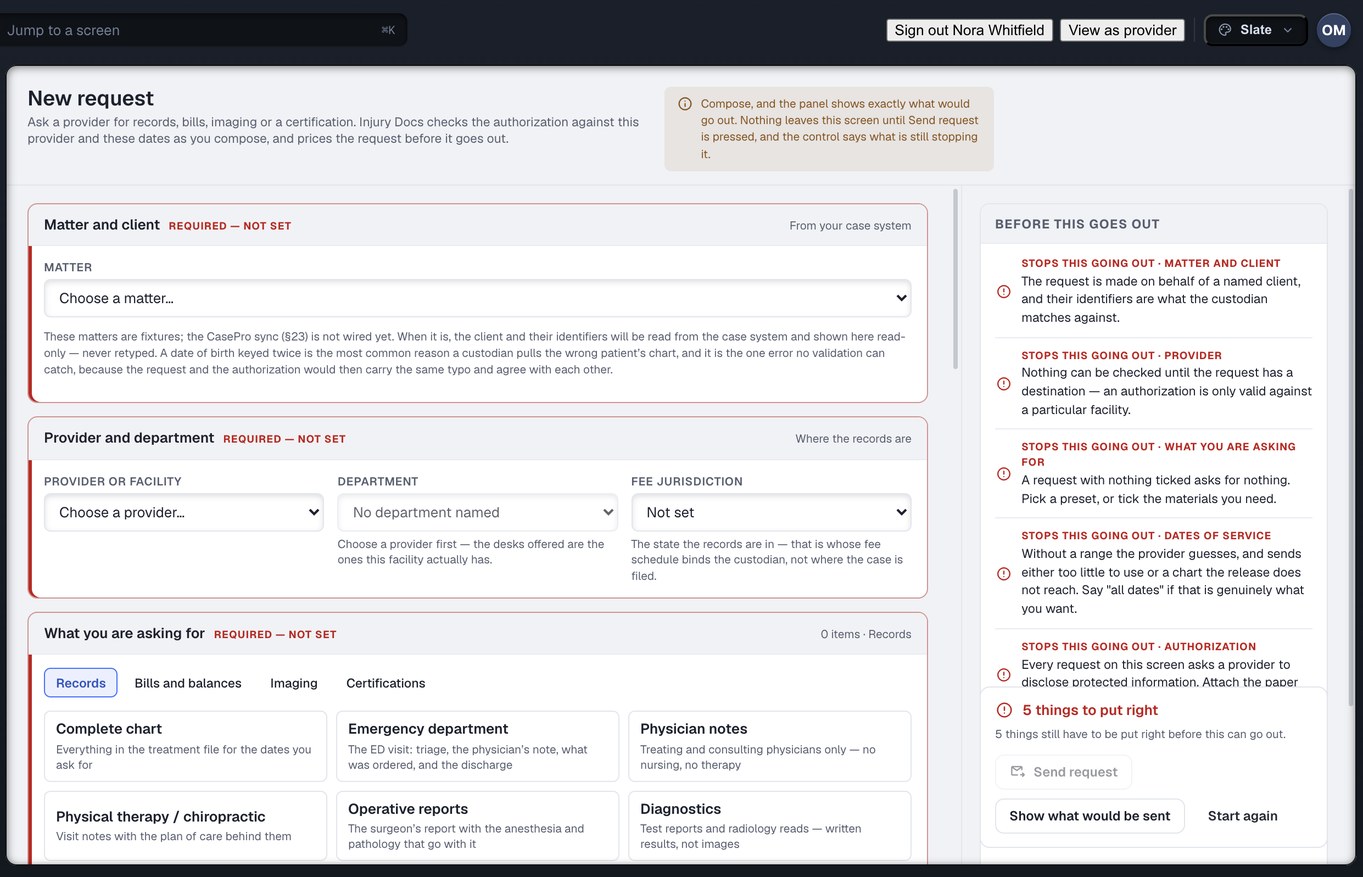
Captured from the running build, 24 September 2026. Demonstration data — every name, matter and figure is a fixture, not a real client, clinic or balance.
The materials are the request
A preset fills the ticks in and then stops existing. There is no second description hiding behind the list, so your screen and the clinic’s can never describe the same ask differently.
Nothing expands at send time
Change one tick and the request is still exactly what you approved. Nothing is added behind your back on the way out of the building.
Usable on the day it lands
The preset is what makes it fast. The itemisation is what makes the result usable when it arrives, rather than the start of a second request.
A gate you cannot walk past by accident
Two kinds of separately-protected record are in no preset at all — not even the one called “complete chart”. A one-click bundle can never sweep them in. Asking for one is a deliberate act, and the authorisation engine raises a finding the moment it happens.
- Presets fill the materials in one click, and you can see and change every tick before it goes.
- Imaging, DICOM and radiology reports have presets of their own.
- The composer refuses to send while a gate is unanswered — and says which gate.
- The authorisation you attach travels with the request, so the clinic is not asking you for it a week later.
Captured from the running build, 24 September 2026. Demonstration data — every name, matter and figure is a fixture, not a real client, clinic or balance.
Four hundred requests, with the blast radius shown first
Mass tort work means raising hundreds of requests at once, and the ordinary way to find out what that cost is an invoice three weeks later. Bulk ordering computes the whole thing first — the total to the cent, the duplicates of something already open, and the rows blocked because no authorisation is on file. Then it offers you the button.
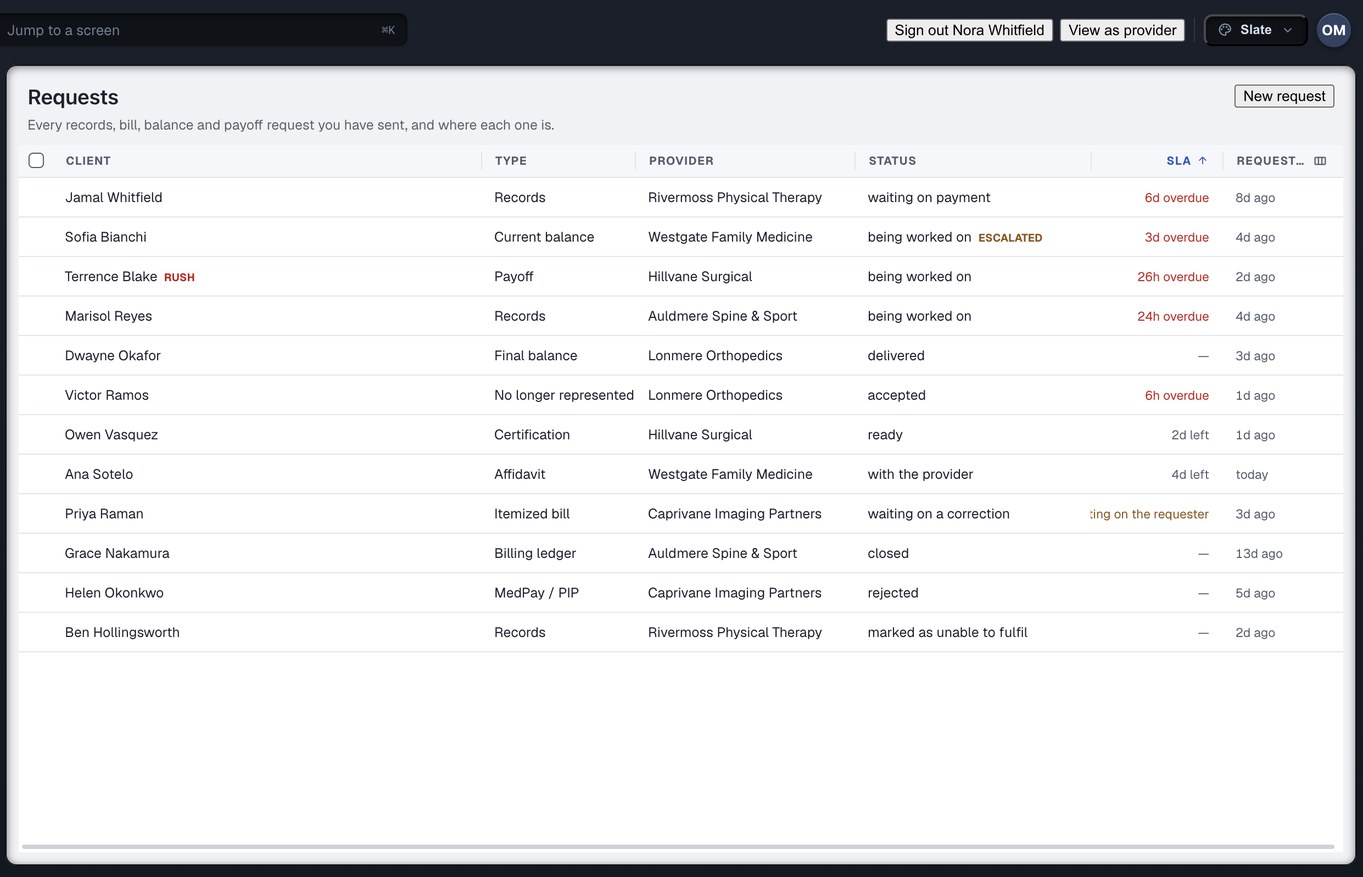
The single-request board, one request per row. Captured from the running build, 24 September 2026. Demonstration data — every name, matter and figure is a fixture, not a real client, clinic or balance.
Twenty-one states, including the two everybody else collapses
A request moves through a named lifecycle rather than a status somebody types. Fifteen states on the path through, and six endings, five of which are not success. Every one of them is folded on read from the log of what actually happened, so nothing on any screen is a stored flag somebody forgot to update.
“Delivered” happens twice
The request reaching the clinic and the documents reaching you are two different events, so they are two states with two clocks. Collapsing them is how a firm ends up believing a chart is in the building.
A chart that arrives in batches
Part-sent is a state of its own, rather than being forced into “done” or “not started”. Nothing is marked complete here to make a queue look tidy.
Five honest endings
Rejected, cancelled, expired, duplicate and unable to fulfil. An ask that died is a fact on the record, with the reason attached, not a row that quietly stops moving.
The clock stops when the delay is yours
If a clinic is waiting on your office for a corrected authorisation, that interval is not counted against the clinic. Both numbers stay on screen: hours actually held, and hours since you raised it.
You can escalate on a state. You cannot escalate on an email that has not been replied to — which is why “where is that chart?” has no answer today rather than a slow one.
What the request turns into
Bills, Balances & Payoffs
Billed, paid, adjusted, reduced and outstanding on one ledger, derived from this request log rather than stored.
Read the ledger page → LRLien Resolution & Reductions
Every offer, counter and acceptance kept — with the basis you stated, shown to the clinic word for word.
Read the lien page → ECThe Exception Center
Every finding from every engine in one ranked list — by what it costs and what it blocks, not by age.
Read the exceptions page →Raise the ask. Watch the state move.
Create your firm account and put every records and billing ask on one state machine — itemised, gated, and read by the clinic at the same moment you read it.
Already have a portal account? Sign in →