How it works · for a law firm

One request. Raised on Monday, answerable every day after.

Follow one bundle the whole way: records, an itemised bill and an 18.001 affidavit, from one clinic, on one matter. Every step below is a state on the request, not a note somebody left. Where a step is held by your office rather than the clinic, this page says so — and so does the clock.

Create your firm account Talk to our team
1
bundle, three asks
21
states it can be in
0
accounts the clinic creates
✓  The composer refuses while a gate is unanswered ✓  The clock pauses when the delay is yours ✓  The custodian is a real account ✓  Every state derived from the log
01The ask

One bundle, one clinic, one date-of-service range

A paralegal raises it once. Materials are ticked rather than described, because “all records” means the whole chart to one custodian and the last visit to another — and nobody finds out which for three weeks. A preset fills the ticks in and then stops existing: the materials are the request, so your screen and the clinic’s can never describe it differently.
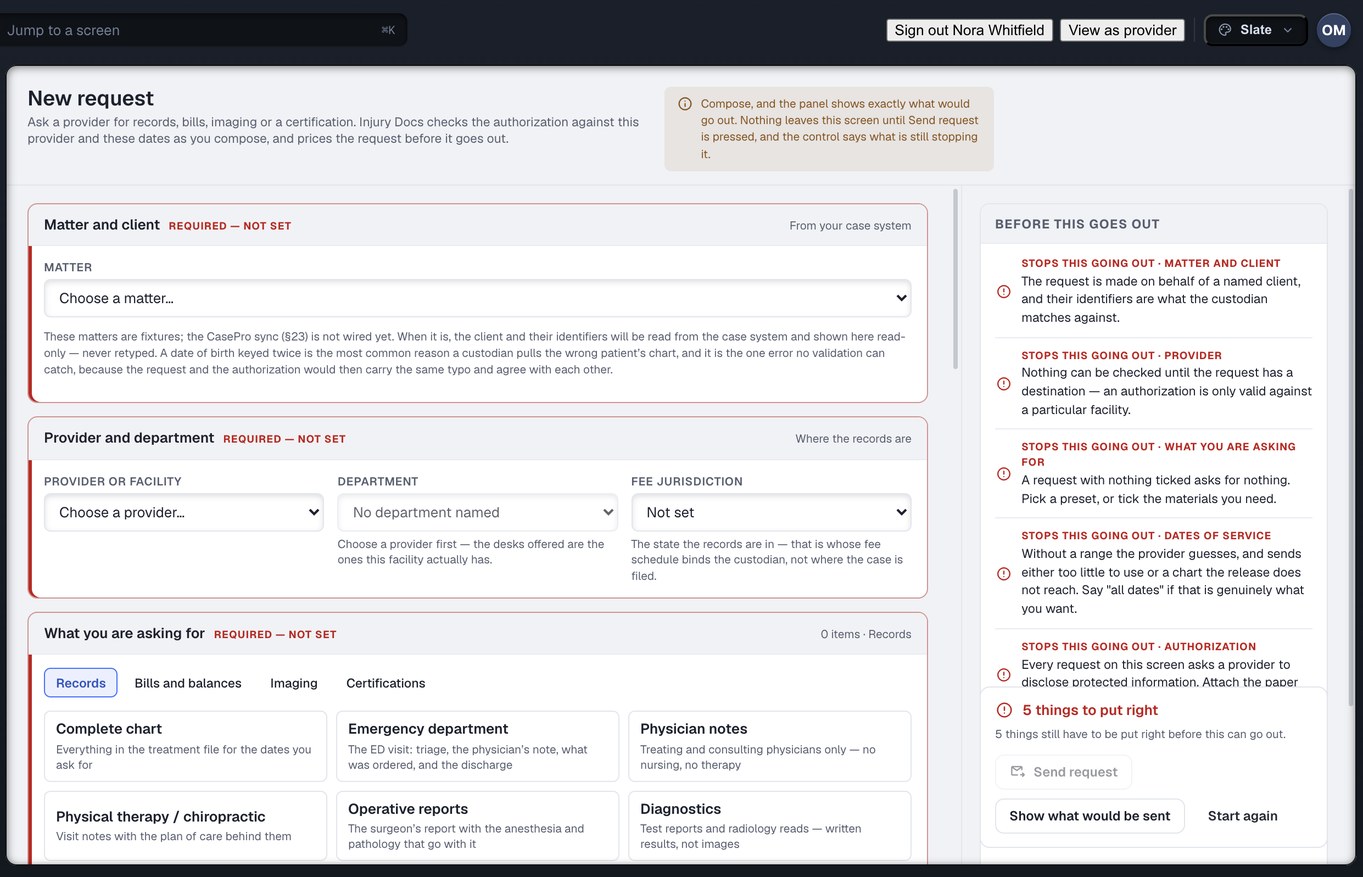
RR The recordsNamed materials a records clerk can go and pull without ringing you to ask what you meant. Change one tick and the request is still exactly what you approved; nothing expands behind your back at send time.
IB The itemised billAsked for as its own material on the same request, not as a second thread three weeks later. When it lands it goes onto the ledger as a number, exact to the cent, and the affidavit later reads its charges from there.
AF The 18.001 affidavitYour firm supplies the form — it is your form, drafted to your reading of the rule. Injury Docs carries it, addresses it to a custodian who is a real account, and fills it in from the record rather than from recollection.
§ The gate before it sendsThe composer refuses to send if the release on file does not cover that clinic, those dates, those materials. It is a refusal rather than a warning, and it names the gate it failed. The separately-protected categories are in no preset, so they can only be asked for deliberately.
New request FIRM RAIL
The request builder in Injury Docs: a records, bill, balance or payoff request against one provider, with its itemised materials list, date-of-service window and authorisation

Captured from the running build, 24 September 2026. Demonstration data — every name, matter and figure is a fixture, not a real client, clinic or balance.

02The sequence

What happens after you press send

Twelve steps, in order. The clinic never creates an account, never signs in and never learns a portal — every clinic gets a dedicated inbound fax number and a dedicated email alias bound to its organisation, and that is the entire install. They fax and email exactly as they do today. The matching is ours.

1 Your desk The firm raises itOne bundle, one clinic, one patient, one date-of-service range, materials ticked. The release is attached and your own affidavit form goes with it.
2 In flight It is deliveredcreated → delivered_to_provider. On the network it lands in the clinic’s Inbox. Off it, we fax and email it with a cover sheet carrying a request code and a QR — and that code is the join key for everything that comes back.
3 Clinic The clinic accepts, and the clock startsviewed → accepted. A defective release does not go to accepted — it goes to awaiting_requirement, and the clock pauses, because the delay is now yours.
4 Clinic They pull the chart and the bill from their own systemManual, unchanged, and not our business. Every clinic runs a different practice system, so we do not try to automate the export. We remove the destination instead.
5 Clinic The dropThey fax or email it to their own number. The same clicks they make today, to an address that happens to be bound to their organisation.
6 Ours We match it to the requestPatient, date of birth, dates of service, provider, document types. The request code first, the content second, confidence-scored throughout. Unsure becomes a review row, never a silent guess — and a fax carrying two patients is split into two.
7 Ours Completeness, against the materials listSix ticked, four arrived → partially_fulfilled, with the two still outstanding named on both screens and the clock still running. This is the whole point of ticking materials rather than writing a paragraph: something can tell you what is missing.
8 Ours Scope check on what arrivedAnything outside the authorised date range, or outside the authorised categories, is flagged before it reaches your office. A clinic sending more than was asked for is a problem for whoever receives it.
9 Ours AssemblyPaginate, Bates, derive the page count. The bill lands on the ledger as a number — exact to the cent — and both the page count and that number are used again in the next step.
10 Custodian The affidavit goes back pre-filledYour own form, populated from the patient, the provider, the custodian, the date-of-service range, the charges off the ledger and the page count off the assembled set. The clinic prints it, the custodian swears it before their own notary exactly as they do now, and scans it back to the same number.
11 Your desk Out to the firmfulfilled → delivered_to_requester → downloaded → closed. Four separate states, because a packet that reached your office and a packet somebody actually opened are not the same fact.
12 After Money, then memoryThe fee is invoiced against the request that earned it. And the log stays — so nine months later, when the balance is disputed, the question of what was sent has an answer on the record rather than in somebody’s recollection.
03States and the clock

Twenty-one states — fifteen on the path, six endings

A request moves through a named lifecycle rather than a status somebody types. Every state is derived from what happened, so “where is my request” has a real answer at every point on it — and you can escalate on a state, which is something you cannot do to an email that has not been replied to.

The path this request took
created → delivered_to_provider → viewed → accepted → awaiting_requirement → partially_fulfilled → fulfilled → defective → corrected → delivered_to_requester → downloaded → closed

Fifteen states lie on the path through. The twelve above are the ones this particular request passed; the others are the turns it did not take. Two of them are the affidavit defect loop: a deliverable that arrived and is not usable is marked defective, with what is wrong named on the request, and becomes corrected when a usable replacement is on file — the first affidavit stays in the log and is never the one attached to a demand. Note that delivered appears twice and means two different things — the request reaching the clinic, and the documents reaching you — so they are separate states with separate clocks.

6 endings — one of them success
closed rejected cancelled expired duplicate unable to fulfil

Nothing is marked complete to make a queue look tidy. A request that could not be answered says so, in its own state, and stays legible in every report that counts it.

15 actions on a request

Escalate it. Reassign it to another desk. Hand it over when the specialist who raised it is on holiday. Correct the release and let the clock resume. Cancel it honestly.

An email thread has none of these. The only escalation it offers is sending the same email again.

And the clock stops when the delay is yours

If the clinic is waiting on your office for a corrected release, that time is not counted against the clinic. Their clock pauses at awaiting_requirement and restarts when you unblock them. The wall-clock age of the request is still on screen — always answerable — but it is not the number their standing is computed from.

One request · four intervals · three of them theirs
Accepted, working
Paused — waiting on your office
Working again
Sent
Hours actually held
The clinic’s overdue rate and their ranking are computed off this number, and only this one.
Hours since you raised it
Shown too, always, because your client asks it. The paused interval is visible on the request rather than hidden inside a calculation.

This is the thing clinics care about most on this platform, and it is why they answer this queue before the fax. Intervals shown are schematic.

04The custodian

The affidavit works because the custodian is an account

In most systems the records custodian is a name typed into a form — a string on a document, with nowhere to send anything and nobody to chase. Here partner.record_custodian is a first-class account in its own organisation family, which is the whole reason step 10 above can exist.

A

It is addressed to somebody

The affidavit goes to an account, on a request, with a state. If it does not come back, the thing that is outstanding is a row on a screen with a name on it — not a memory that somebody was going to follow up.

B

It is filled from the record

Charges come off the ledger and the page count comes off the assembled set — the same set that was Bates-stamped in step 9. Two numbers that are wrong more often than any others on an affidavit, taken from the thing they describe.

C

The oath is unchanged

The custodian swears it before their own notary, exactly as they do today, and scans it back to the same number the records went out on. We do not notarise anything and we do not stand between the custodian and the officer taking the oath.

Two things this page will not do

It will not tell you your deadline. The affidavit timing rules are your reading of the statute, not ours, and they are encoded from counsel’s reading when your firm is set up — never from anyone’s recollection of what the number is. Injury Docs carries your form and your dates; the law is yours.

It will not promise notarisation. Clinics already handle that step and handle it before they send. It is not on the critical path here, and we will not sell you something we are not doing.

05Closeout

The afternoon the case settles

A settlement is one event in your system. What it actually starts is between three and fifteen simultaneous conversations with different clinics, each owing a final bill, a final balance, a payoff figure and a statement of what it needs before it will sign a release. Your disbursement does not wait on the slowest of them. It waits on the last one anybody remembered to chase.
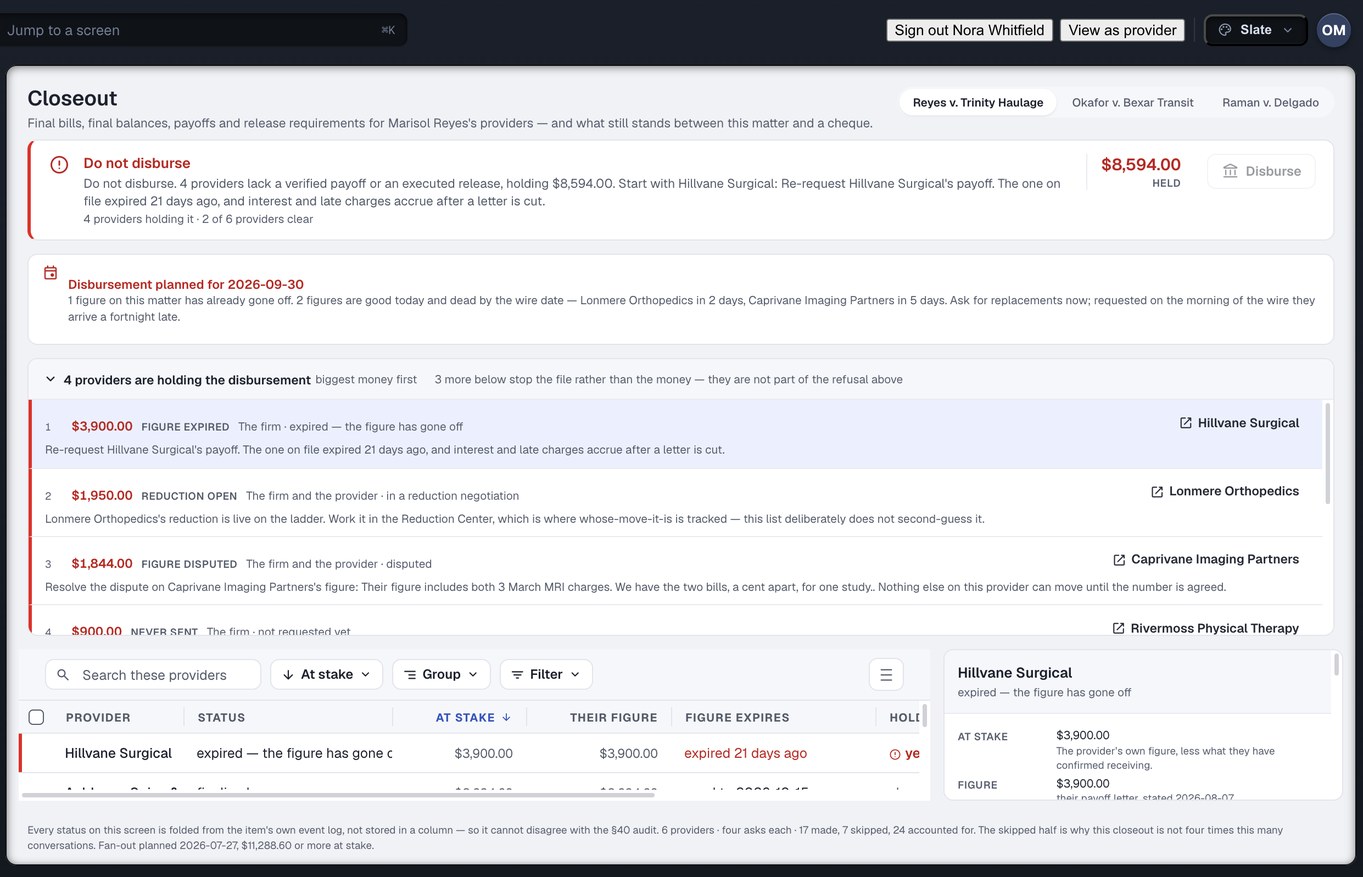
1R One row per clinicEach with its own state and its own clock. Nine clinics is nine rows, not one task called “chase the liens” that somebody ticks when they are tired.
RD It re-derives nothingWhat is outstanding comes from the ledger, the negotiation from the lien ladder, the ask from the request. Closeout is a question asked of records that already exist, so it cannot disagree with the screens they came from.
WD Every blocker names whose desk it is onAnd what would clear it. Yours, the clinic’s, or ours — stated on the row rather than inferred from who replied last.
? It answers one question out loudCan the firm disburse yet, and if not, why. That is the whole screen. The matter that sat for six weeks after it settled did not have a slow provider — it had one nobody was assigned to.
Closeout FIRM RAIL
The closeout screen in Injury Docs: final balances, payoffs and releases per clinic, and what still blocks disbursement

Captured from the running build, 24 September 2026. Demonstration data — every name, matter and figure is a fixture, not a real client, clinic or balance.

From raised to closed, with an answer at every step

Create your firm account and raise the first one against a clinic you are already waiting on — or bring us a matter and we will walk the sequence on it with you.

Create your firm account Talk to our team

Want the engineering underneath it? Read the technology page →