Notes for plaintiff firms.
Four pieces on the mechanics of getting records, bills and lien figures out of a clinic — written for the people who actually do it. No gated downloads, no sign-in wall, no sales sheet dressed as a guide. Read them here.
Four reads, start anywhere
The thirteen things you ask a clinic for — and which one has a screen
Open the contact page of whatever your firm uses to order medical records today and read it as an inventory rather than a directory. Count the named request types. In the systems firms use today there are thirteen, and they are answered by twelve shared mailboxes and a phone tree. Exactly one of the thirteen has a screen behind it.
The thirteen are unremarkable, which is the point. Records. Itemised bills. Billing ledgers. Balances. Final balances. Payoffs. Affidavits. Certifications. Case status. Claim status. No-lien representations. MedPay and PIP confirmations. Paid-to-facility and procedure requests. Every one of those is something a records specialist does dozens of times a month, and every one of them is the same shape underneath: ask a clinic for something, and find out later whether it came.
What an email thread does not have
A thread has no status — you cannot ask it where it is, only read it and form an opinion. It has no owner — it belongs to whoever happened to send it, and to nobody if they are out. It has no clock — nothing in the mailbox knows that a records request is four days old and a payoff on a settled matter is forty. And it has no history that survives a forward, a reply-all or a personnel change.
Which is why the only escalation available in most firms is to send the same email again. And why “where is the Reyes chart?” does not have a slow answer — it has no answer. Somebody opens a thread and reads it, and what they report back is a reading rather than a fact.
You cannot escalate on an email that has not been replied to. You can escalate on a state.
One object, thirteen types
Injury Docs takes the opposite approach: there is one Request in the product, and the named asks are types of it. Bills, payoffs, liens and settlement payments are not separate features here. They are the same object with a different type field, riding one state machine, one clock and one audit trail.
That collapse buys three concrete things. One builder raises any of them, with the materials itemised rather than described. One Requests screen holds every ask your firm has ever made and where each one stands. And one reporting surface, because there is exactly one object to report on — so spend, fulfilment time, overdue rate and provider performance are all computed off the same log, not stitched together from separate systems at the end of a quarter.
It also makes an ask something you can hand over. A request can be escalated, reassigned and inherited. A thread cannot.
Twenty-one states, five of them honest endings
A request moves through a named lifecycle rather than a status somebody types. Twenty-one states: fifteen on the path through, and six endings. One ending is success — closed — and five are not: rejected, cancelled, expired, duplicate, and unable to fulfil. Nothing is marked complete to make a queue look tidy.
Three details in that lifecycle are worth your attention. “Delivered” happens twice and means two different things — the request reaching the clinic, and the documents reaching you — so they are separate states with separate clocks, which is the difference between a clinic that ignored you and a clinic that answered into a fax queue nobody checks. And a chart that arrives in three batches has a state of its own rather than being forced into “done” or “not started”. And a deliverable that arrived and is not usable — an affidavit with a defect in it — is marked defective, with what is wrong named, and then corrected. Both sit on the path after fulfilled, because a correction is the ordinary outcome, not an ending.
None of the twenty-one is a stored flag. Every one is folded on read from an append-only log of what actually happened, so your screen and the clinic’s are the same derivation rather than two copies that can drift.
Eleven of the thirteen raise from the request builder as it stands; the remaining types are declared, so their identifiers never change when they arrive. Press Send and the request reaches the clinic you chose on Injury Docs, recorded, for real, to an append-only, hash-chained log that both desks read. What does not exist yet is document delivery: the clinic sends the records its usual way and records how, and your desk shows it.
Why “all records” is the most expensive phrase in your request
The defect is born in the free-text box, and it is always the same defect. You write “all records and billing”. To one custodian that means the complete chart. To another it means the last visit. “Billing” means an itemised statement to one practice and a UB-04 to the next. Neither of you is wrong. You were never talking about the same thing.
What makes it expensive is not the misunderstanding — it is when you find out. The clinic fulfils what they read, in good faith, and closes the request. Three weeks later somebody opens the file to draft a demand and discovers the chart stops before the surgery, or that the statement has no CPT codes on it. Now you re-request, and the second clock starts from a standing start on a matter with a deadline on it.
The paragraph is what makes a request fast to write. The list is what makes the result usable on the day it arrives.
A list a clerk could pull
So a request in Injury Docs does not carry a paragraph. It carries named materials — specific things a records clerk can go and find without ringing you to ask what you meant. Office notes for a date range. The itemised statement. The billing ledger. The imaging report, which is a different object from the imaging itself. Each line is a thing, not an adjective.
People reasonably ask whether that makes ordering slower. It does not, because presets do the typing. A preset fills the ticks in and then stops existing: the materials are the request. There is no hidden bundle definition that your screen resolves one way and the clinic’s resolves another, and nothing is expanded behind your back at send time. Change one tick and the request is still exactly what you approved, line for line.
Which is also why the clinic side can be fast. A queue of requests that each carry a checklist is a queue a records clerk can work. A queue of paragraphs is a queue somebody has to interpret, and interpretation is where the three weeks go.
The two categories that are in no preset at all
Two kinds of separately-protected record sit outside every preset, including the one-click “complete chart”. They cannot be swept in by a bundle. Asking for one is a deliberate act you take on purpose, and the moment you do, the authorisation engine raises a finding against the request.
That is not a warning dialog at five to six that somebody clicks through. It is a property of how the request is built: a preset physically cannot contain those lines, so a hurried paralegal cannot accidentally order them, and a clinic that receives one knows it was asked for on purpose. Imaging, DICOM and radiology reports get their own presets for the same reason — they are different asks with different fulfilment paths, and collapsing them into “records” is how you end up with a report and no study.
What itemisation does for partial delivery
A chart that arrives in three batches is the normal case, not the exception, and it is where paragraph-shaped requests fall apart completely: the clinic thinks it is done, you think it is not, and there is nothing to point at. When the request is a list, “partly sent” becomes a checkable fact. You can see which lines landed and which did not, and so can they, on the same record.
The composer refuses to send while a gate is unanswered, and it says which gate rather than greying out a button. As with everything else on this site: the screens and the rules behind them are built and demonstrable. A send reaches the clinic’s desk and is recorded to an append-only, hash-chained log that both sides read.
Recording the basis: how reduction asks survive the file review
A reduction ask is two things: a number, and a reason. The number travels well. The reason almost never does. It is spoken on a call, or written in a letter that lives in one person’s sent items, and by the time anybody reviews the file the record shows an amount with nothing attached to it.
Read the same event from the clinic’s desk and you can see why it stalls. A reduction lands with a number and no reasoning, against a bill they cannot reconstruct, on a matter that closed. Their options are to accept a figure they cannot check, or to sit on it. Most sit on it, and nine months later the balance is an argument about whose spreadsheet is right.
One ledger, computed once
Injury Docs puts billed, paid, adjusted, reduced and outstanding on a single ledger per matter, derived from the request log rather than stored anywhere. The clinic is not reading a copy of your ledger and you are not reading a copy of theirs — it is the same derivation, computed once, displayed twice.
On top of that ledger sit the liens asserted against the recovery, and every reduction you have asked for. Each offer, each counter and each acceptance is kept, and kept with the basis you stated. Where your screen records a reconciliation, the clinic sees the amount removed and your stated reason word for word — not a summary of it, not a status code, and not a category from a dropdown.
A balance dispute becomes a reading exercise. Nobody has to reconstruct what was sent from memory.
Every figure is exact to the cent and rendered to two decimals, on both screens. There is no rounding anywhere in the product, because a rounded figure is the thing that makes a clinic ask you to prove the rest of it. And nothing in the history is overwritten: a correction is a new entry, so it never erases what it corrected. Nine months later, the question “what happened” has an answer on the record.
The afternoon the case settles
A settlement is one event in your case system. What it starts is between three and fifteen simultaneous conversations with different clinics, each owing a final bill, a final balance, a payoff figure and a statement of what they need before they will sign a release.
Closeout puts one row per clinic, each with its own state and its own clock, and answers a single question out loud: can the firm disburse yet, and if not, why. Every blocker names what would clear it and whose desk that is on. It re-derives nothing — what is outstanding comes from the ledger, the negotiation from the lien ladder, the ask from the request.
That matters because the matter that sat for six weeks after it settled did not have a slow provider. It had one nobody was assigned to. Your disbursement does not wait on the slowest clinic; it waits on the last one anybody remembered to chase.
What to actually write in the basis
- The line items you are reconciling, not the total — a clinic can check a line and cannot check a lump sum.
- The ground for the ask in your own words, stated once and kept, so the next person to open the file inherits your reasoning rather than your arithmetic.
- What you are not disputing, which is usually the faster half of the conversation.
- What would close it from your side, so the counter you get back is a counter rather than a question.
The lien and reduction screens are built and every figure on them derives live from the request log. Reduction and settlement payment are among the request types that are declared rather than raising from the builder as it stands. The lien and reduction screens run on the desktop build and are not live on the web app yet, so a clinic cannot read or answer an offer from its own desk today. The reasoning above is how it is designed to work and what you can watch run, not a description of live traffic.
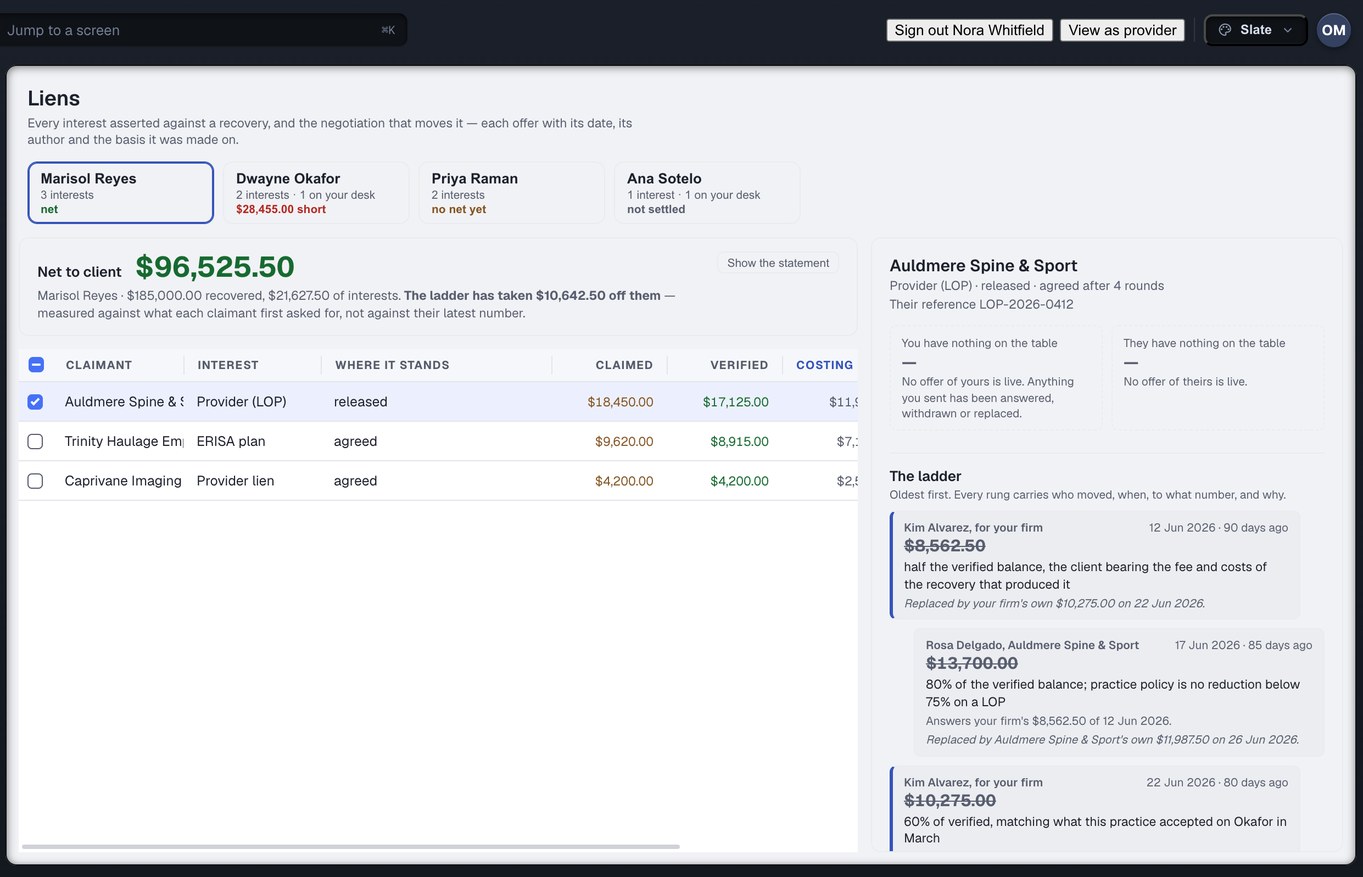
Captured from the running build, 24 September 2026. Demonstration data — every name, matter and figure is a fixture, not a real client, clinic or balance.
A queue that reconciles out loud
Most alert lists are sorted by age, and an alert list sorted by age teaches you to ignore it. The oldest thing in the queue is usually the least important thing in the queue — that is why it got old. Meanwhile the finding that will cost you the demand deadline sits eleven rows down because it happened this morning.
The Exception Center ranks by what a problem costs you and what it blocks. Every finding from every engine arrives in the same list: late requests, missing bills, authorisation defects, ledger disagreements. One ranked list for the whole firm, not one per module.
Duplicates are merged, not repeated
A late request that is also missing its bill is one row with both facts on it, not three rows that each look like a separate problem. This is the unglamorous half of making a queue usable: a list that shows you the same underlying trouble three times is a list you will start skimming, and a list you skim is a list that has stopped working.
Every row names whose desk it is on — yours, the clinic’s, or ours — and what would end it. Not “action required”, but the specific next act and who owes it. That second field is what turns a queue into work that can be assigned.
Findings it could not classify are shown and labelled as unclassified, never dropped.
The arithmetic is printed on the page
This is the part we are proudest of, and it is the easiest to check. The queue states how many findings it received, how many it carried into the list, how many it merged into another row, and how many it could not classify. Those numbers reconcile. You can add them up by hand and confirm that nothing went missing between the engines and the screen.
That sounds like a small thing until you have used a queue that silently swallows what it does not understand. A queue that drops its unclassifiable rows will look cleaner than ours and will be lying to you, and the way you find out is the case where the thing that mattered was the thing the classifier had never seen before. Omitting a gap teaches you that you are looking at your whole operation. We would rather show you the gap and say what it is.
The section most portals do not have
The Exception Center has a “waiting on us” view, and so does the firm dashboard. Most portals in this market do not, for a structural reason: they are built to show you what your vendors owe you. But a large share of stuck requests are stuck on your own side — an authorisation that needs correcting, a fee that needs approving, a query nobody answered — and a clinic’s clock is paused for every hour of it.
So the same ranked list that tells you which clinics are late also tells you which of your own rows are holding the clinic up. It is an uncomfortable screen to build and a useful one to own, and it is the honest complement to grading anybody else on a clock.
What it answers, in one sentence, is the question neither side of this market currently answers at all: what is wrong across my whole book, and whose desk is it on?
Read it here, then bring us the matter it describes
Every mechanism above is on screen in the build today. Walk your own worst-stuck case through it with us and you will see exactly where the product ends and the plan begins.
More on the mechanics: records requests · liens & reductions · the exception center