Neither the firm nor the clinic. Still an account of your own.
A partner is an organisation in Injury Docs, with its own people and its own sign-in — not a shared login borrowed from the practice or the firm you work for. What you hold against somebody else’s record is a grant: issued by the organisation that owns that record, scoped to one request by its number, naming what you may do with it, and carrying an expiry somebody typed. When the date passes, so does the access.
Partners have no rail of their own in this build. You work under the screens of the organisation that granted you the request, and Omnis works its own desk. This page says which role page is yours, and which roles have an account and no page at all.
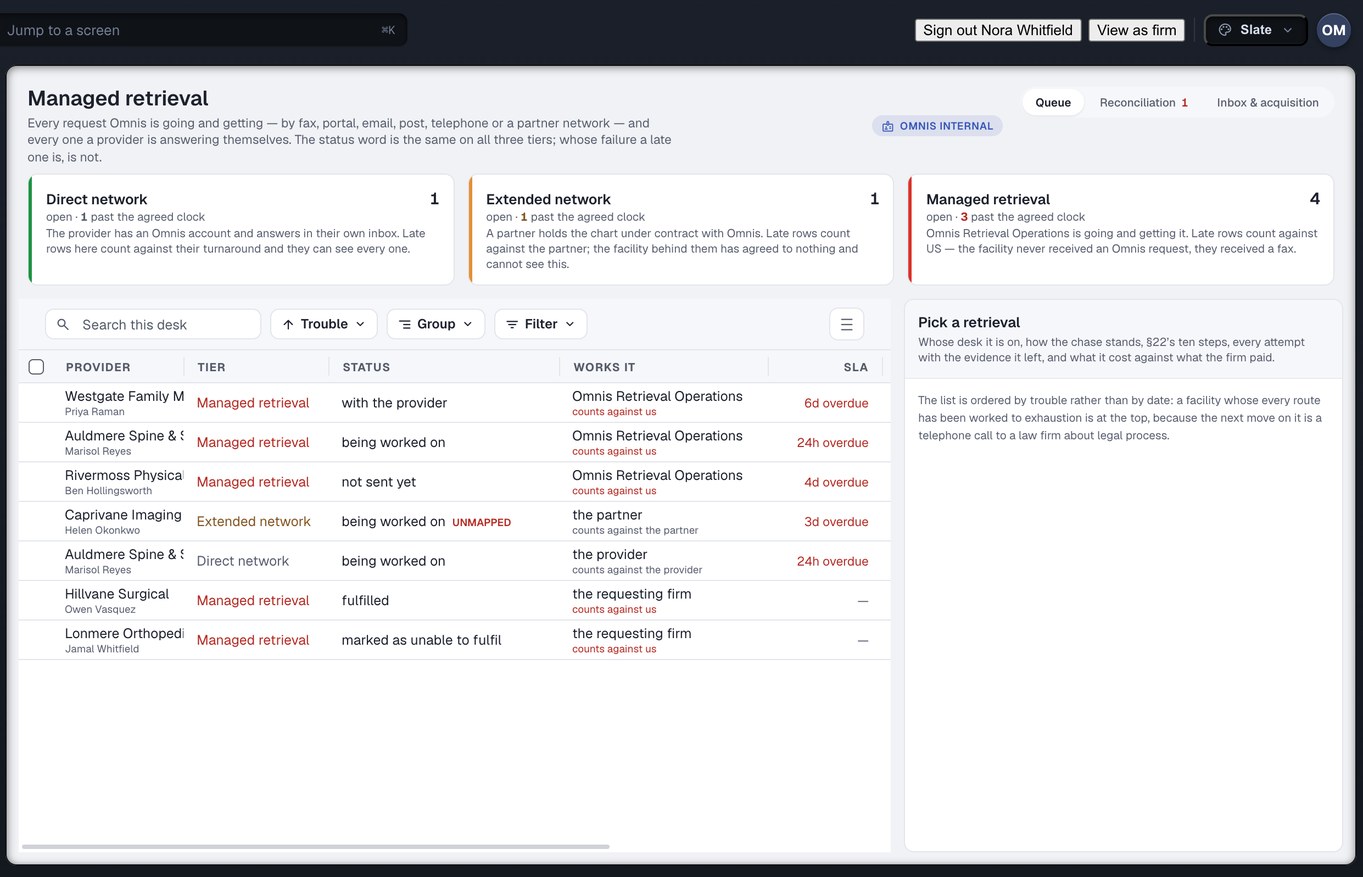
Omnis’s own managed-retrieval desk — an Omnis-internal screen, not a partner’s, shown because it is where a chase through an outside custodian is tracked. Captured from the running build, 24 September 2026. Demonstration data — every name, matter and figure is a fixture, not a real client, clinic or balance.
Three ways to be neither side
The systems firms use today model two parties. Injury Docs models a third, and it turns out the third comes in three shapes — which is why this family has two pages and one plain paragraph rather than one page for everybody.
You release records for a clinic that is not you
An outside custodian, or a release-of-information vendor. The practice hands you one request, you fulfil and certify it, and the affidavit is sworn by you. Custodians & ROI vendors →
You give an opinion on a matter you did not treat
A medical or other expert. The conflict check is completed before the engagement exists, and the materials reach you as a grant with your name and an expiry on it. Experts →
You get the client to the room, or through the conversation
An interpreter or a transportation provider. You have an account so a firm can name you on a referral. You have no screens and no page, and the paragraph below says exactly that. Read it ↓
Two pages, each written for one chair
Each opens on the screen that page is about. Neither is a partner’s screen — one is Omnis’s own desk and one is the firm’s — because in this build a partner works inside somebody else’s screens under a grant.
A grant, not a login
A practice delegates one request to your organisation, with an expiry, and you see that request and nothing else the practice owns. The affidavit is sworn by you, and when one comes back wrong, what is wrong with it is written down.
Read the custodian and vendor page →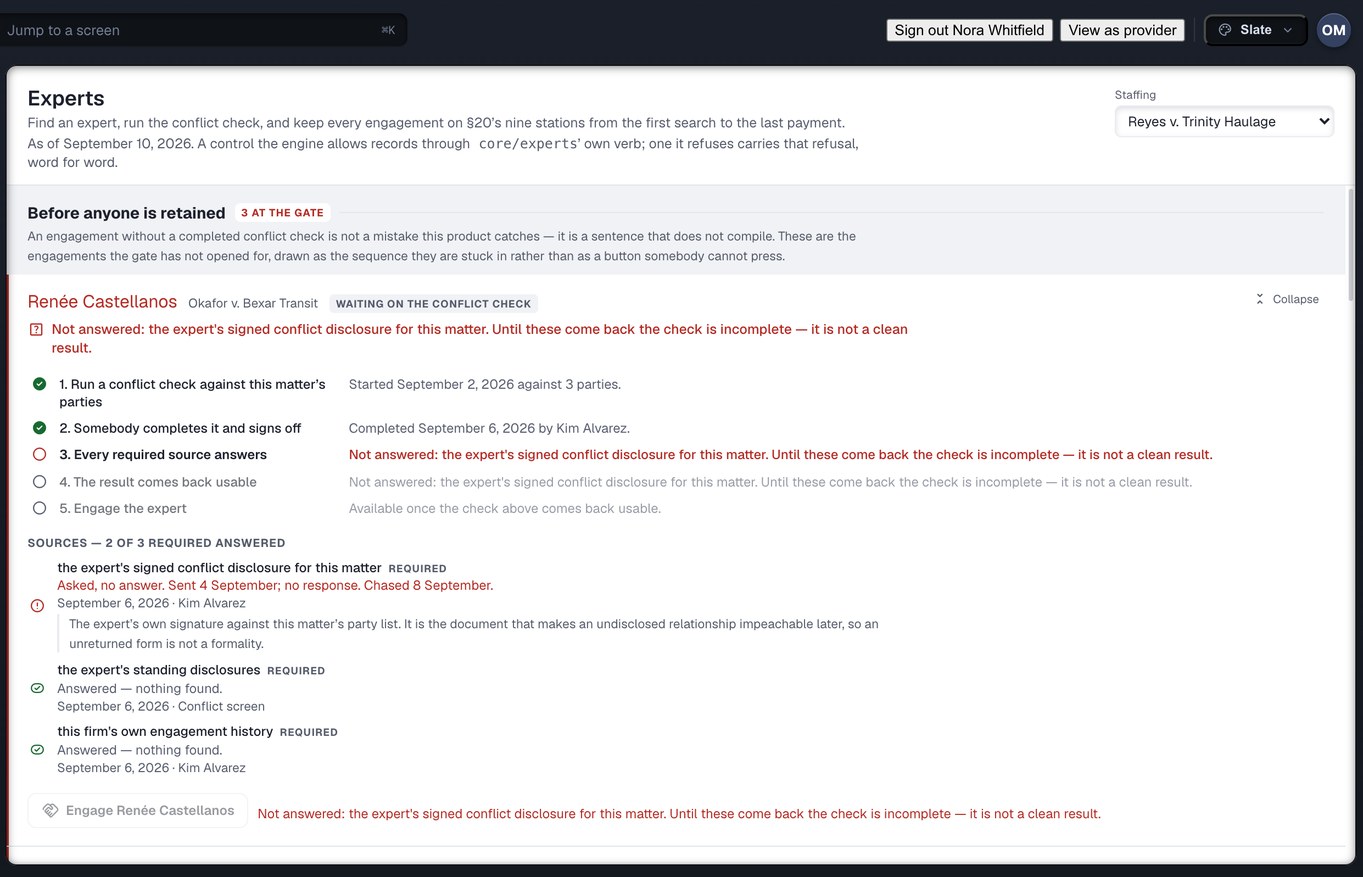
Retained on the record, never rated on it
The conflict check is completed before the engagement can exist, and what you are sent arrives as a named grant that expires, with the outstanding items listed. Your fee terms and invoices are recorded as agreed and as billed, and nothing on your profile is a star, a win rate or an exclusion rate.
Read the expert page →Captured from the running build, 24 September 2026. Demonstration data — every name, matter and figure is a fixture. The first thumbnail is Omnis’s own managed-retrieval desk and the second is the law firm’s Experts screen; neither is a partner-side screen, because there is none.
Every partner role, in the words the product uses
Each partner role is a template for what your organisation may do inside its own shop: your own queue, your own staff list, your own invoices. It grants nothing about a clinic’s or a firm’s data. That arrives only as a grant the owner issued, and it expires.
Why say this plainly rather than leave the two roles off the list: a partner who reads that they have an account will look for a screen. There is none to find, and it is better that you learn that here than after you have asked a firm to add you.
What every grant carries
- The name of the one organisation whose record it opens — the owner’s, never yours
- The verbs you may use and the kinds of thing you may use them on, listed — there is no way to write “everything”
- The request or requests it covers, by number
- An expiry. It is required, not optional, and the access ends on that date
- Who issued it, when, and one line in their own words saying why — shown on the owner’s “who can see our records” screen, so a grant nobody can explain is a grant somebody will revoke
What no grant can carry
- A seat at the table where providers are listed and ranked and firms choose. A partner acting for a practice must never be able to act as that practice — publish its listing, accept its referral, move its standing. Every partner role is shut out of that surface, and so is every grant
- Anything the owner did not name. A grant that permitted every verb on every kind would not be a grant, it would be an account — and then you should be a user of that organisation with a role, visible in its user list
- The owner’s own view. A grant adds access to you and takes nothing from them; the practice keeps seeing everything it saw before
On the rails: the build’s 26 routed destinations, counted on 24 September 2026, belong to three audiences — 14 for the law firm, 12 for the clinic, 3 for Omnis’s own network-operations desk. None belongs to a partner. That is what “no rail of your own” means, and it is a fact about this build rather than a promise about the next one.
Ask to see a grant from your side of it.
Bring the request a practice delegated to you, or the engagement a firm retained you on, and we will walk you through what the grant names, when it ends, and what the owner sees while you hold it.
Are you a law firm? Read the firm side → · A clinic? Read the provider side → · Not sure which chair? Who it is for →