You already did the work. Now get credit for it.
Legal requests arrive as a queue instead of a fax pile. Your clock stops when the delay is the firm’s. And when a balance is questioned nine months later, the answer is on the record — because the firm is reading the same ledger you are.
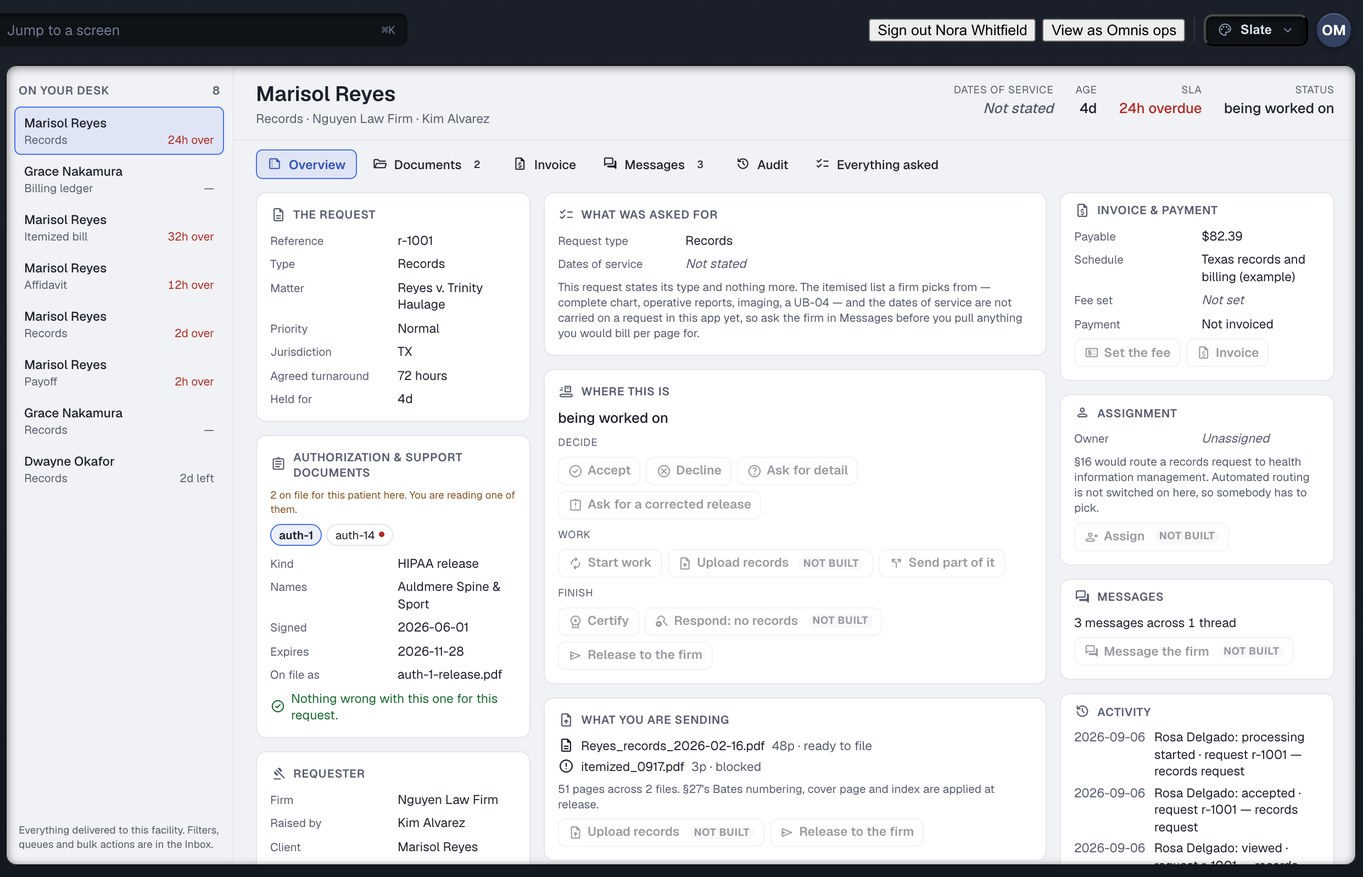
Captured from the running build, 24 September 2026. Demonstration data — every name, matter and figure is a fixture, not a real client, clinic or balance.
You are being graded on a clock you do not control
Every clinic that treats personal-injury patients on a lien knows these three. None of them is about being slow.
The work gets done, then chased anyway
You pulled the chart on Tuesday. The firm cannot see that, so on Thursday somebody rings. You answer the phone instead of pulling the next chart, and the call is logged nowhere — so it happens again next week.
The delay is theirs and the blame is yours
A release that does not cover your facility stops the request — correctly. You wait eleven days for a corrected one. Every one of those days is counted against you, and “slow provider” sticks with no appeal.
The balance is questioned nine months later
A reduction lands with a number and no reasoning, against a bill you cannot reconstruct, on a matter that closed. The money sat unpaid for a year first, and there is no record of what you actually sent.
Eight mechanisms, and five of them exist for your side of it
Injury Docs is one system that the firm and the clinic both open. That sounds like a detail. It is the reason each of the following can be true at all.
A work queue, not a shop window
Legal requests arrive in stages rather than in an inbox: what is new, what needs review, what is waiting on the firm, what is waiting on a fee, what is being pulled, what is ready, what is late and what is disputed. Oldest and most overdue first. A records clerk works a queue, so the product is a queue.
- You can also work by patient rather than by request
- Nothing is ranked by how much a firm pays — this is not a listing you can buy your way up
- Every row says which firm, which matter and which clock
What this means for you: triage stops being a person reading a fax pile and starts being the first screen you open.
By patient, not only by request
One person treating on a lien generates a records ask in March, an itemised bill in June and a final balance in November. In a queue sorted by request those are three unrelated rows, and nothing on any of them tells you they are the same chart. Patients is the other axis: the people whose records have been asked for, and every request standing against each one.
- Pull once for a patient rather than three times across a year
- The authorisation that covers each ask is on the chart with it
- This is records, not case management — scheduling and clinical documentation are CarePro, a different Omnis product
What this means for you: a records clerk works by patient at least as often as by request, so the product has both axes rather than the one that was easier to build.
Your clock stops while you are waiting on the firm
This is the one to read twice. When a request is blocked on the requesting firm — a defective authorisation, a missing date range, an unanswered question — your clock pauses and starts again when they unblock you. The wall-clock age of the request is still shown, because it is always a fair question. It is simply not the number your standing is computed from.
- Hours actually held is the number in your analytics, your overdue rate and your ranking
- The paused interval is visible to the firm too, so they can see the delay is on their desk
- A request that has been fulfilled stops counting at once — not when somebody gets round to downloading it
What this means for you: you are measured on the time you actually had the work. That is the whole difference between a fair scoreboard and an unfair one.
A partly-sent chart is not “done”
Send three of the five documents today because that is all the release covers, and most systems give you two buttons that both lie: mark it complete, or leave it untouched. Injury Docs has a state for what actually happened. The part that is out reaches the firm now, the request stays open, the clock keeps running, and the remainder is still owed.
- A chart can arrive in three batches without anything being an exception
- “The rest does not exist” is also a real ending, and it has its own state
- The firm is never told their records arrived when three of them did not
What this means for you: you never have to choose between a tidy queue and a true one.
Fifteen actions, and every refusal is a sentence
Accept, reject, request information, request an authorisation, start processing, upload, fulfil partially, set a fee, invoice, assign, message, request an extension, certify, record that no records exist, complete. Each one is checked against what is actually allowed at this point in the request’s life — and where it is refused, the screen tells you why and whose job the remedy is.
- The refusal sentence comes from the engine that made the decision, not from a screen guessing at one
- The same verb behaves identically in the row, the drawer, the keyboard shortcut and the bulk action
- Where the product has no opinion, it says so rather than inventing a reason
What this means for you: nobody has to ring anybody to find out why a button is grey.
The authorisation is checked before you disclose anything
A release that does not name your facility, or does not cover the dates of service, or does not cover the records being asked for, stops the request before anything leaves your building. The firm is told exactly which of the three is wrong. And two categories of record are in no preset at all — including “complete chart” — so a one-click bundle can never sweep them in.
- Behavioural-health notes and substance-use treatment records are never included by a preset
- Ticking one is a deliberate act, and the moment it happens the authorisation engine raises a finding
- A defective release is a blocked request with a remedy on it, not a bounce the firm reads as you being difficult
What this means for you: the gate that protects the patient is the same gate that protects you, and it is on by default.
The firm reads your ledger, and their reasoning lands on it
Not a copy of your ledger — the same derivation, computed once. Where the firm reconciles a bill, you see the amount removed and the reason they stated, word for word, rather than a status code. Every figure is exact to the cent and rendered to two decimals, on both screens.
- Letters of protection you hold, and the reductions being negotiated, sit in the same place
- Every offer, counter and acceptance in a reduction is kept with the basis stated
- Payments, payouts and statements are derived from the same log
What this means for you: a balance dispute becomes a reading exercise. Nobody has to reconstruct what was sent from memory.
Your standing is explained, not scored
Twelve reports about your practice. On any given book of work not all twelve can honestly be computed — a ninetieth percentile off six requests is not a percentile, it is a number with a shape. The ones that cannot be computed are shown in the same list as the rest, saying what is missing and what would close it, rather than being quietly dropped or filled in.
- Every figure carries its denominator in words and the window it covers — never a bare percentage
- A percentile the data cannot support is refused outright rather than estimated
- Omitting a gap would teach you that you are looking at your whole operation; faking one means you would act on it
What this means for you: a ranking you cannot interrogate is not a ranking, it is a rumour. This one shows its working, including where it has none.
Counted from the build, not from a case study
Facts about what exists — not claims about what it will earn you. We have no provider outcome figures yet, and we will not print a guess.
Twelve destinations. Three of them are about getting paid.
The clinic desk is deliberately short. It is a working surface, not a product tour.
The three that change your week
Inbox
Every legal request waiting on you, in stages, oldest and most overdue first.
Records
Fulfil a request, see the authorisation that covers it, certify what you send.
Billing & Balances, LOPs & Liens, Payments
What you billed, what is outstanding, what the firm reconciled it to — and on what stated basis.
And the rest of the desk
Patients
The people whose charts have been asked for, and every request standing against each one. One person generates a records ask, a bill ask and a final balance months apart; this is the view that shows they are the same chart.
Exceptions
Your own blocked rows, ranked by what they cost and what they block. Each row names the remedy and whose desk it is on. Rows it could not classify are shown and labelled, never dropped.
Messages
Threads attached to the request they belong to, with canned responses for the common bounces. No orphan email threads, and the same clock as the request the thread hangs off.
Referrals
Incoming referrals from law firms — accept, schedule, and report back through to seen. A referral is a tracked object like everything else.
Analytics
Acceptance time, fulfilment time, overdue rate and requester mix. Fulfilment time uses hours actually held, with pauses excluded — and it says plainly what it cannot measure.
Who asks
What each law firm was billed, what it paid, and how long it took — the mirror of Analytics. It measures the firms asking, so you can decide whom to keep treating on a lien, and prints nothing until it has three observations to stand on.
Settings
Your organisation, locations and departments, your fee schedule, the clocks you agree to, and your payout account.
A ranking you cannot interrogate is not a ranking
Every balance, clock and ranking on your screen is computed live from the request log rather than stored. That is also why the product can tell you when a figure is not worth printing — it knows what it counted.
Analytics shows acceptance time, fulfilment time, overdue rate and requester mix, and says plainly what it cannot measure rather than producing a single number with nothing behind it.
Create your clinic accountWritten for the person actually doing the job
Nine practice roles, each a set of grants, so the front desk sees the queue and not the payout account. Each page below is one desk’s week.
Records custodians
The release desk as a work queue: by patient, the release checked before you disclose, a partly-sent chart that is not “done”, the affidavit addressed to somebody.
Read the page → BBBilling and balances
The balance questioned nine months later is already on the ledger the firm reads. Payoffs with a good-through date, the reduction ladder from your chair, payouts that cannot exceed what is owed.
Read the page → OMOwners and office managers
Your standing, explained and not scored. Who asks, and what they paid. Nine roles, locations and departments, fee rules with a named reviewer.
Read the page → CFClinicians and the front desk
What never reaches your desk. The one thing each of you does: a signature that comes addressed and filled, and a referral accepted, scheduled and reported back.
Read the page →Four things this deliberately is not
Each of these is a real product somewhere — two of them are ours. Being clear about the edges is how you can trust the middle.
Not practice software
The Patients screen is records — whose charts have been asked for, and every request standing against each one. Scheduling, clinical notes and encounter documentation are CarePro, a different Omnis product.
Not a medical-summary product
Injury Docs moves records and the money attached to them. Writing the medical narrative out of those records is MedChron, a different Omnis product.
Not a listing you buy attention in
Requests are ranked by what is oldest and most overdue. Nothing in the queue moves because a firm or a clinic paid for it to move.
Not a replacement for your fax line
Injury Docs does not turn off the way work reaches you today. It changes what happens to the work that does come through it — a state, an owner, a clock, and a record of what you sent.
The six that come up first
What stops a firm asking for records we are not allowed to release?
The authorisation check runs before anything is disclosed. If the release does not name your facility, or does not cover the dates of service, or does not cover the records asked for, the request stops and the firm is told which of the three is wrong. Behavioural-health notes and substance-use treatment records are additionally in no preset at all, including “complete chart”.
How is our overdue rate calculated?
From hours you actually held the request, with every interval where you were waiting on the firm excluded. The wall-clock age is shown as well, because it is a fair question, but it is not what your standing is computed from. A request you fulfilled stops counting the moment you fulfilled it.
Do we have to pay to be ranked higher?
No. Requests are ranked by what is oldest and most overdue, never by what anybody pays. Your fee schedule and payout arrangements are a settings destination in the product — they have no effect on where a request sits in anyone’s queue.
Is this practice software? Will it replace our scheduling?
No. The Patients screen is records — whose charts have been asked for, and every request standing against each one. Scheduling, clinical documentation and encounter notes are CarePro, a separate Omnis product. We keep them apart so that neither has to pretend to be the other.
What happens to the requests we get from firms who are not on this?
They keep arriving the way they arrive now. Injury Docs does not turn off your fax machine. What it changes is that everything which does come through it has a state, an owner and a clock — and a record of what you sent, for the conversation nine months later.
Can we work by patient instead of by request?
Both axes are there. Patients is the list of people whose records have been asked for, with every request standing against each one — so a records ask in March, a bill ask in June and a final balance in November read as one chart rather than three unrelated rows.
Bring the request that is still open from March.
Create your clinic account and put a week of your request pile through the queue, the clock and the ledger — and see exactly which intervals were never yours to answer for.
Are you a law firm? Read the firm side → · An injured person? What happens to your records →