The release desk, run as a queue. Oldest first, release checked, nothing marked done that is not.
Records, itemised bills, balances and affidavits from every law firm arrive as one queue, oldest and most overdue first. The release is checked before a page leaves the building. A partly-sent chart stays open with the remainder named. And your clock stops the moment you are waiting on the firm.
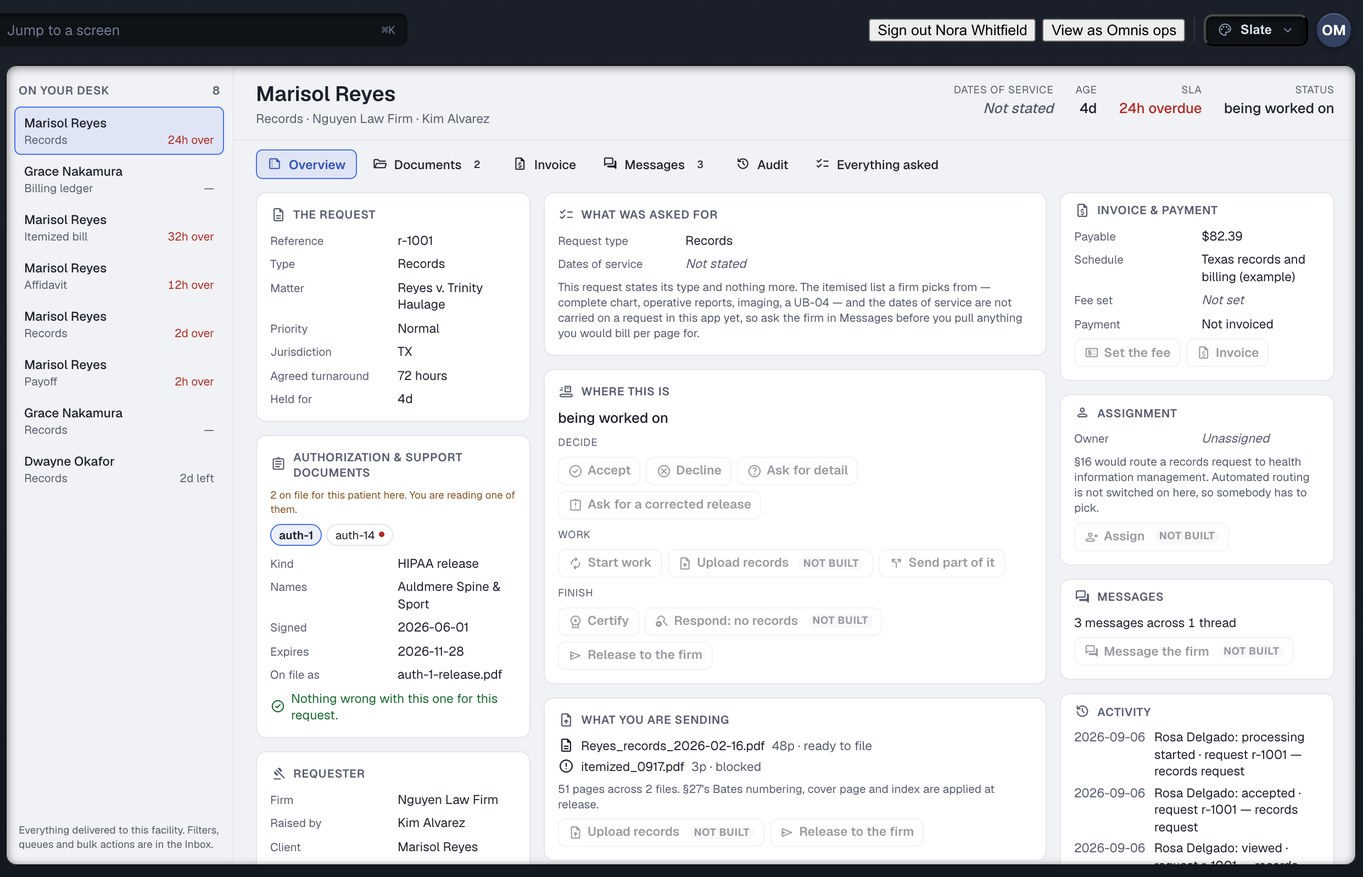
Captured from the running build, 24 September 2026. Demonstration data — every name, matter and figure is a fixture, not a real client, clinic or balance.
Release of information is three jobs, and a fax pile does none of them
Triage, permission and completeness. Everyone who runs a records desk does all three by hand, and the tools were built for none of them.
The pile has no order
The oldest request is under this morning’s fax. Working first-in-first-out means somebody reads the whole pile before starting, and the one that is already late is the one nobody has found yet. A phone call from the firm is how you learn which request that was.
You cannot see what you are allowed to send
The release is page two of a fax. The request says “all records”. The date range on the paper is blank, or names the practice by its old name, or does not reach the visit the firm actually wants. You bounce it and get called slow, or you send it and hope. Neither choice is recorded anywhere.
“Done” has one meaning and the work has four
Part of the chart went out because that is all the release covered. You searched and there is nothing. The affidavit came back with the firm saying it will not do. Every one of those is a different fact with a different next act, and the systems firms use today give you one checkbox for all of them.
Eight mechanisms of the release desk
The firm and the practice open the same system and read the same request. That is what lets each of the following be true rather than promised.
A work queue, not a shop window
Requests sit in nine queues: New, Needs review, Awaiting authorization, Awaiting payment, Processing, Ready, Completed, Overdue and Disputed. Within each, oldest and most overdue first. Nothing moves up because a firm pays more, and nothing is a stored flag — every queue is computed from what has actually happened to the request.
- Awaiting authorization and Awaiting payment say plainly that the next act is not yours
- Every row names the firm, the matter, the dates of service asked for and the clock
- A request with a defective release is routed into work rather than bounced, so somebody at your desk sees it
What this means for you: the first screen you open in the morning is already in the order you should work it.
By patient, not only by request
One client treating on a lien produces a records ask in March, an itemised bill ask in June and a final balance in November. Sorted by request, those are three unrelated rows and you pull the chart three times. Patients is the other axis: the people whose charts have been asked for, and every request standing against each one, so the three rows read as one chart.
- The release that covers each ask sits on the chart with it
- Two ordinary requests to one practice for one client — January’s visit and June’s course — are told apart by their dates of service, not flagged as duplicates
- This is records, not practice software — scheduling and clinical documentation are CarePro, a different Omnis product
What this means for you: you work a chart once, and the second and third asks against it are already where you left the first.
The release is checked before you disclose anything
The paper has to name this practice, cover these dates of service and cover the categories being asked for. The check is on the paper as written — nothing trims a name, reads a blank date range as “everything”, fills in a blank provider line from the request, or nudges an expiry to cover the request in hand. The only thing the check can produce is a finding: a sentence naming what is wrong and whose desk the fix is on.
- “Nobody recorded what the paper says” is refused exactly as “the paper says no” is — with a different sentence, because one sends someone to read the page and the other to the patient
- A release granting to “any and all healthcare providers” passes only when somebody read that line and recorded it verbatim; a blank grantee line never becomes one
- Behavioural-health notes and substance-use treatment records are in no preset at all, including “complete chart”
What this means for you: a defective release is a blocked request with a remedy on it, not a bounce the firm reads as you being difficult.
Uploading is not releasing
Putting the pulled chart on the request discloses nothing to the firm. You can upload while a firm is still correcting its release, because the act the release governs is the last one — Release to the firm — and that is the one the check gates. What goes out is not a link that lives forever. It is an expiring grant naming the exact version you sent, and every refusal to open it is logged as a denied access.
- A grant issued against the first copy does not silently start serving a corrected second copy
- Where a watermark is configured it carries the recipient and the grant, so a page that turns up somewhere can be traced to the release it left through
- Superseded versions are never deleted, so “what did the first production contain” is always answerable
What this means for you: your desk is never idled waiting on paperwork the firm is going to fix anyway, and nothing leaves until it is allowed to.
A partly-sent chart is not “done”
When the release covers March through December and the firm asked from January, the finding hands you the window you can release today. Send part of it releases those dates and keeps the rest open. The request does not leave your queue, the clock keeps running, and what is still outstanding is named on both screens — yours and the firm’s.
- A chart can arrive in three batches without any of them being an exception
- Respond: no records is an answer, not a failure — it records what was searched and over which dates, and ends the request
- The firm is never told their records arrived when part of them did not
What this means for you: you never have to choose between a tidy queue and a true one.
Certification of what you sent
Certify attaches a custodian certification to what you are sending, and it is held with the request rather than in a folder somebody has to find later. A certification and an affidavit are the two request types that are not documents but permission to use documents — so a defect in one is treated as what it is: not a late delivery, but the difference between records a firm can use and records it cannot.
- The certification travels with the same expiring grant as the pages it certifies
- Nine months later, “what did you send” is a reading exercise against the log, not a reconstruction from memory
- A production whose page count is short of what its own footer states is flagged as a dispute, not re-read as complete
What this means for you: the thing you certified and the thing that arrived are provably the same pages.
Your clock stops while you wait on the firm
When you send back a defective release, or ask for the date range the request forgot, the request sits in Awaiting authorization and your clock stops until the firm answers. The wall-clock age is still shown, because how long a request has been open is a fair question — it is simply not the number your overdue rate is computed from.
- The clock stops the moment you release to the firm, not when somebody at the firm gets round to downloading
- It is fair in both directions: while you owe a corrected affidavit, it runs
- The paused interval is visible to the firm too, so the delay is on the desk it belongs to
What this means for you: sending a defective release back is the right thing to do, and it no longer costs you.
Fifteen actions, and every refusal is a sentence
Accept. Decline. Ask for detail. Ask for a corrected release. Start work. Upload records. Send part of it. Set the fee. Invoice. Assign. Message the firm. Ask for more time. Certify. Respond: no records. Release to the firm. Each is checked against where the request is in its life, and where it is refused, the screen shows the sentence the engine that refused it wrote — never one a screen guessed at.
- The same verb behaves identically in the row, the side drawer, the keyboard shortcut and the bulk action
- A records account sees the fee on the request in hand, not the whole schedule — pricing is the billing desk’s
- Where the product has no opinion, it says so rather than inventing a reason
What this means for you: nobody rings anybody to find out why a button is grey.
Counted from the build, not from a case study
Facts about what exists, counted on 24 September 2026. We have no time-saved or turnaround figures for any records desk, and we will not print a guess.
Three screens you will live in
The clinic rail has twelve destinations. A records custodian works three of them most of the day. Every capture below is from the running build on demonstration data.
Inbox — the queue
Every legal request waiting on you, in nine queues, oldest and most overdue first. Each row names the firm, the matter and the clock, and the queue it is in says whose act comes next.
In this capture the New queue is empty — every fixture request has already been accepted and is sitting further along. That is what a worked inbox looks like at the end of a day, and it is shown as captured rather than staged.
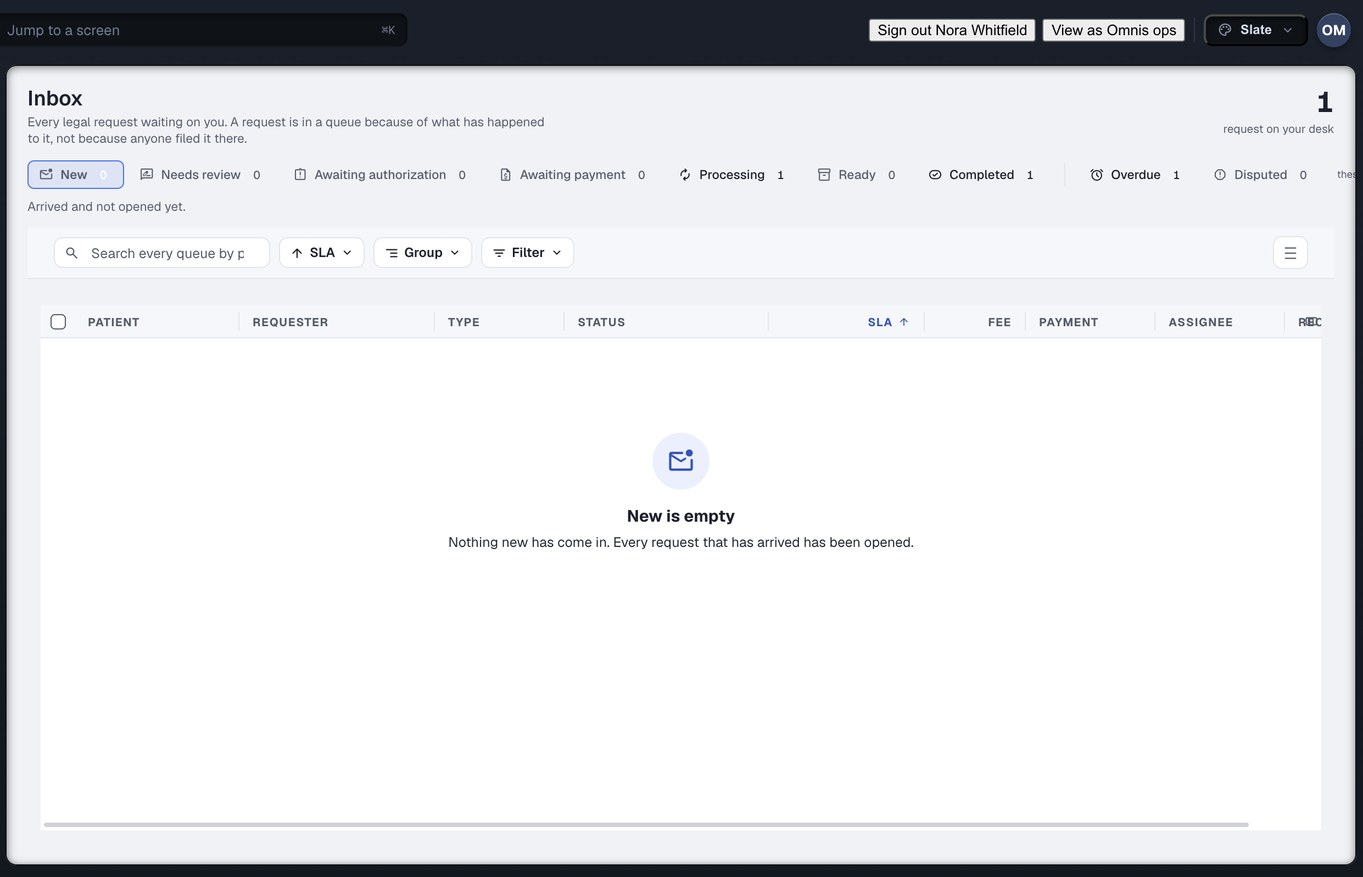
Captured from the running build, 24 September 2026. Demonstration data — every name, matter and figure is a fixture, not a real client, clinic or balance.
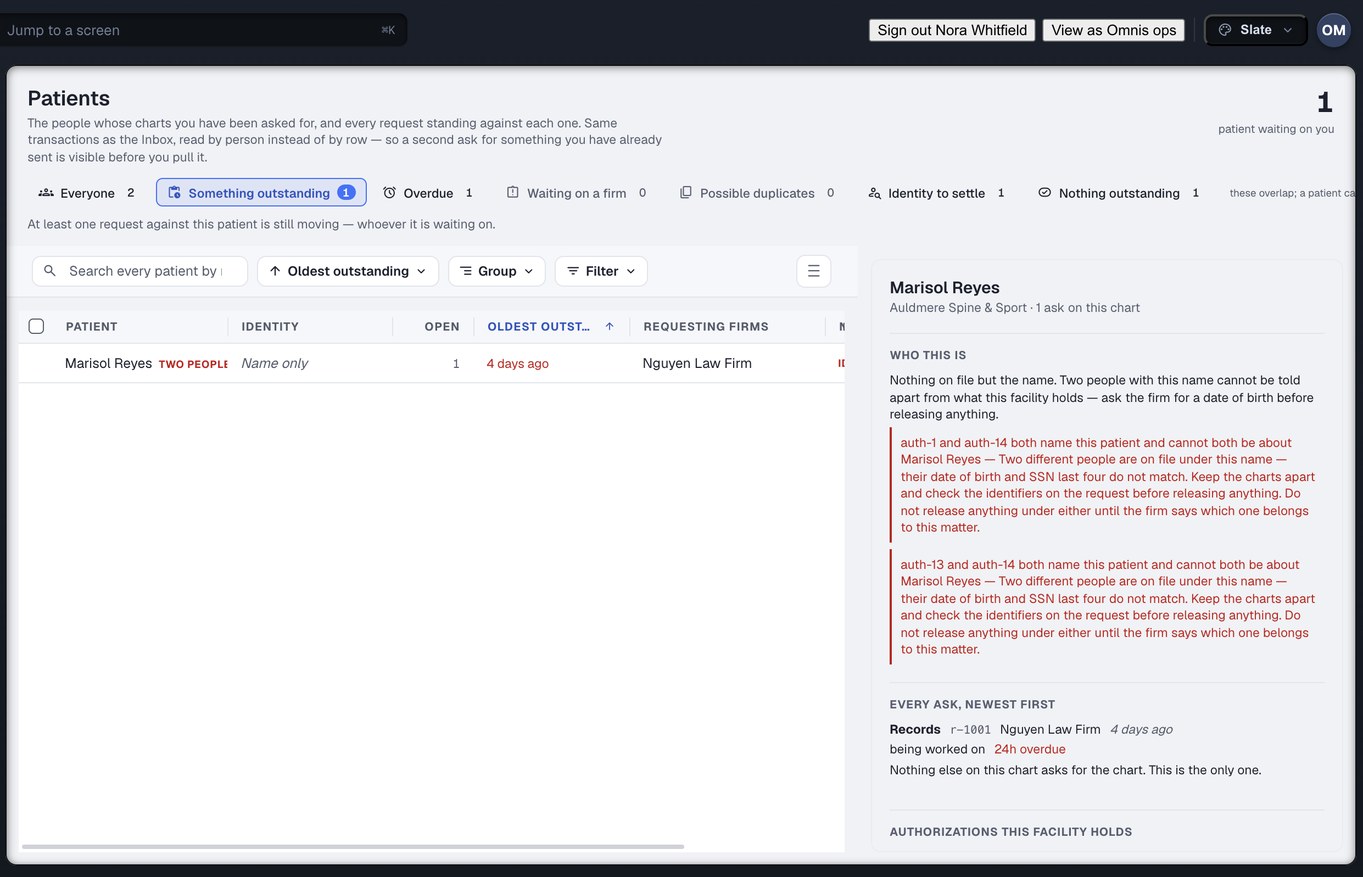
Captured from the running build, 24 September 2026. Demonstration data — every name, matter and figure is a fixture, not a real client, clinic or balance.
Patients — the other axis
The people whose charts have been asked for, and every request standing against each one — records, bill and final balance on one chart rather than three rows in a queue. The release that covers each ask is on the chart with it.
This is records, not practice software. There is no scheduling, no encounter note and no clinical documentation here — those are CarePro, a different Omnis product.
Exceptions — what would unblock each one
Your blocked requests, ranked by what they cost and what they block, each with the remedy and whose desk it is on. A request that is late and also missing its release is one row, not two.
Rows the product could not classify are shown and labelled, never dropped, so the count on the page can be checked by hand.
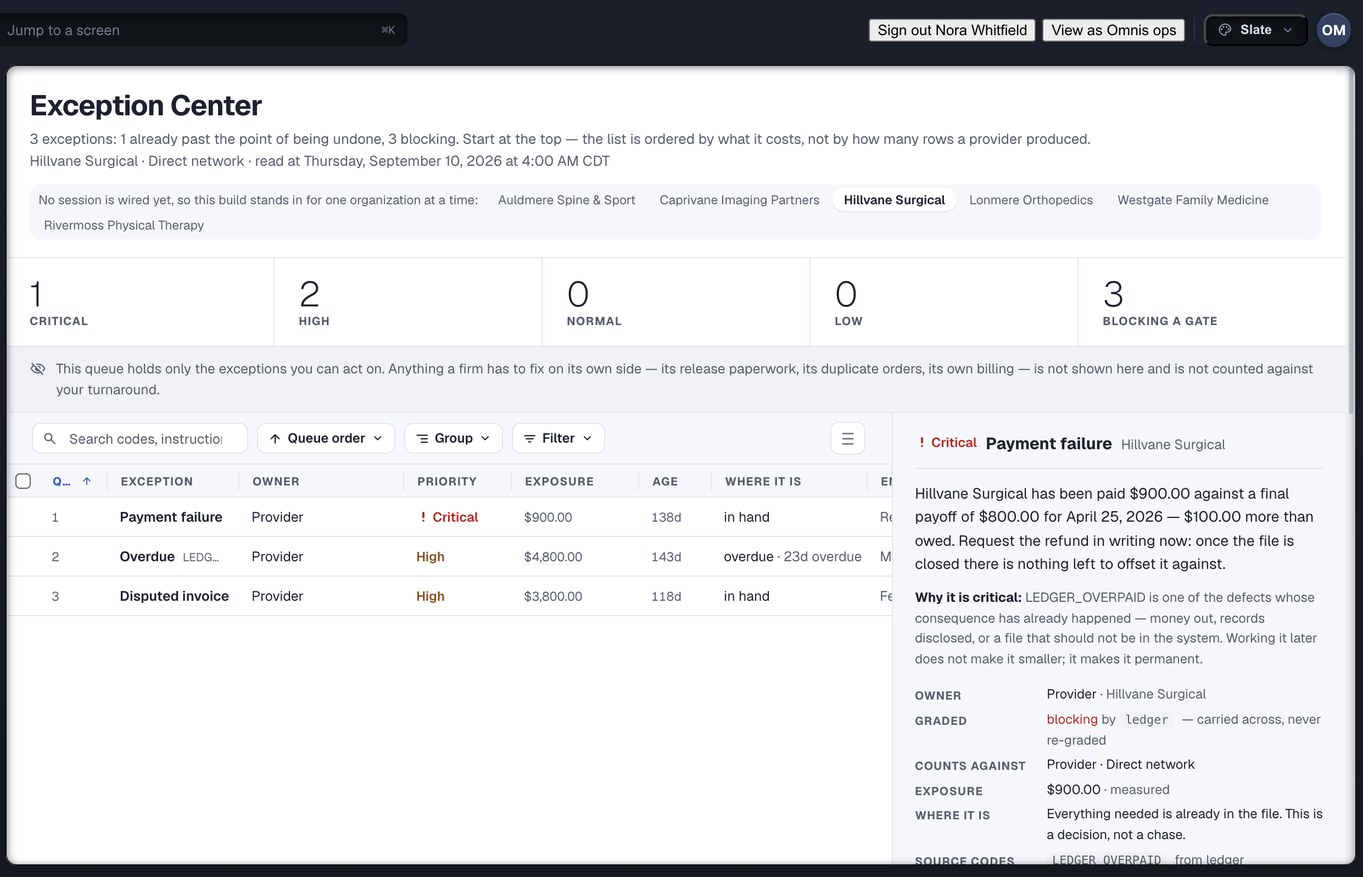
Captured from the running build, 24 September 2026. Demonstration data — every name, matter and figure is a fixture, not a real client, clinic or balance.
It works because the custodian is an account
A business-records affidavit is what lets the firm use the records without putting you on a witness list. Every records product asks for one. Most of them ask a fax number. Here the custodian is one of the thirty-seven roles the product knows, and that one fact is what makes the rest possible.
The firm supplies its own affidavit form. What comes back to you is addressed to a named custodian, filled from the record already on the request, and sworn the way you swear today. Injury Docs does not notarise anything and does not say it does.
Create your practice accountFour things this deliberately is not
Being clear about the edges is how you can trust the middle.
Not a notary
The affidavit is sworn before your own notary, as it is today. Injury Docs prepares the form from the record and carries the sworn copy back on the request. It does not administer the oath and never claims to.
Not practice software
The Patients screen is records — whose charts have been asked for, and every request standing against each one. Scheduling, clinical notes and encounter documentation are CarePro, a different Omnis product.
Not a medical-summary product
Injury Docs moves records and the permission to use them. Writing the medical narrative out of those records is MedChron, a different Omnis product.
Not a replacement for your fax line
Requests from firms who are not on this keep arriving the way they arrive now. What changes is that everything which does come through it has a queue, an owner, a clock, and a record of what you sent.
The six that come up first
The request says “all records”. What do we send?
A request here does not carry a paragraph. It carries named materials and a dates-of-service window, so “all records” never means one thing to the firm and another to you. If the firm left the window blank, that is carried as blank rather than read as everything, and the firm is told to state the range before you are asked to pull anything.
The release names our old practice name. Does it fail?
“Nobody has matched this name to a facility yet” and “this names a different facility” are different findings with different remedies, and the check keeps them apart so a firm is not sent to re-paper a client over a data-entry gap. Where the paper carries your NPI, that is what identifies you — it survives a rename.
The release covers part of the range. Do we hold everything?
No. The finding tells you the window the paper already covers, and Send part of it releases those dates now. The request stays open for the remainder, what is outstanding is named on both screens, and your clock keeps running on the part you still owe — which is the honest state.
Does Injury Docs notarise the affidavit?
No. The firm supplies its own form, it comes to you filled from the record, and you swear it before your own notary as you do today. The sworn copy goes back on the same request. We do not administer the oath and we do not claim to.
We searched and there is nothing. What then?
Respond: no records is an answer, not a failure. It records what was searched and over which dates, ends the request, and the firm reads it as exactly that rather than as a request that went quiet. Your clock stops when you send it.
Our custodian is a contractor, not staff. Can they work the request?
Yes. A custodian outside the practice is a role of its own, and a delivery hands them an account scoped to that one request — seven things they can do, on that request, until the grant expires. They see no fee schedule and nothing about any other patient.
Bring the release you have bounced twice.
Create your practice account and put a week of your request pile through the queue, the check and the clock — and see which intervals were never yours to answer for.
Run the whole practice? Read the provider page → · On the firm side? How a records request is raised →