You do not send the requests. You read what came back.
On the afternoon of the demand and the afternoon the case settles, you need four answers you can sign your name under: is the chart complete for the dates you asked for, which affidavits are actually on file, what every reduction offer was and why, and what still stands between this matter and a cheque. Injury Docs derives each of them from the record of what happened — never from a status somebody typed.
Captured from the running build, 24 September 2026. Demonstration data — every name, matter and figure is a fixture, not a real client, clinic or balance.
Two afternoons a year on every file, and the same question on both
The case manager raised the requests months ago. What lands on your desk is a folder and a sentence — “it’s all in” — and you have to decide whether to believe it. Three ways that goes wrong, none of them the case manager’s fault.
“Complete” means somebody closed the email
Six materials were asked for. Four arrived. In the systems firms use today there is no state for that, so the request is marked done and the two outstanding items are discovered when the defence counts pages — or when you are drafting the specials and the surgical bill is not there.
The affidavit that looks satisfied and fails on objection
A business-records affidavit is what lets the chart in without calling the custodian. One that came back unsworn, signed by the wrong person, or covering the wrong dates reads “received” on the file. Nothing on the folder tells you it is the copy that must never be attached to a demand.
The reduction nobody can explain to the client
A hospital lien went from one number to a much smaller one across four rungs, and the only record is a PDF in a thread the paralegal who ran it has since left. When the client asks why the hospital got that much, or the file is reviewed, the answer is a number somebody used to remember the reason for.
What you read, and why you can put your name under it
Everything below is a fact the firm and the clinic both see, derived once from a record of what happened. That is what makes it something you can decide on rather than something you have to check.
The afternoon of the demand
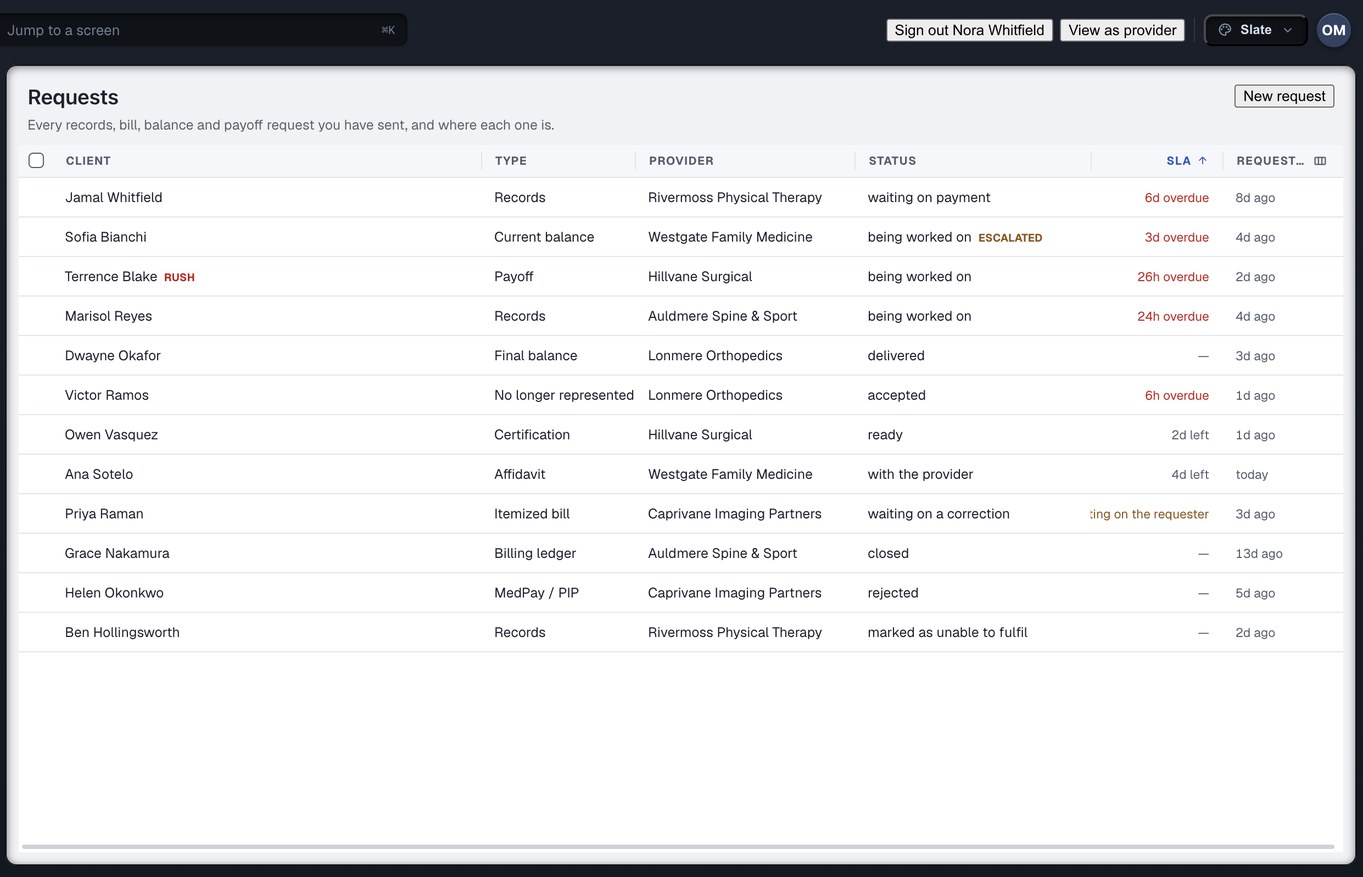
Complete for the dates you asked for, item by item
A request carries a ticked list of materials and a date-of-service window, not a paragraph. When four of six arrive, the request has a state for exactly that — part of it is out and the rest is still owed — and the two outstanding items are named on your screen and the clinic’s. Nothing is marked complete to make a queue look tidy.
- A blank date range is never read as “all dates”. It is shown as “no dates of service stated”, because the two readings differ by a client’s entire history
- “From the collision through the present” is an open bound the request actually states, and the product keeps it open
- “The rest does not exist” is a real ending with its own state, so a row is never chased for records that were destroyed
What this means for you: “is the chart complete” has an answer that names the gap, not a tick that hides it.
An affidavit is a request with its own life, and “defective” is one of its states
Affidavits and certifications are the two request types that do not add a page to the chart; they are what makes the pages already in it self-proving. So the product asks a question of them it asks of nothing else: can the records this covers go in front of a court. The answer is one of four — not yet, defective, unobtainable, or on file — and each names who has the next act.
- One that comes back unsworn, signed by the wrong person or with the wrong dates is recorded as defective, with the defect written down — the clinic owes a replacement sworn by the records custodian, and their clock runs until it arrives
- The corrected one is a separate state, so the file always knows there were two, and the defective first copy is never the one attached to a demand
- After the second defect the sentence on screen says a subpoena to the custodian is usually faster than a third correction — and if the practice has closed, “unobtainable” puts the next act on you rather than leaving a row to be chased forever
What this means for you: “which affidavits are in hand” is read off the record, and the one that would fail on objection cannot pass for the one that would not.
Demand readiness: one question, nine dimensions, and it does not write the demand
Can we send the demand yet, and if not, exactly what is missing and whose desk is it on. The readiness check joins three things the product already holds — what every provider billed and what paper backs it, where every outstanding request is and how late, and whether the release will be honoured — and turns them into a worklist ordered by consequence. Each blocker carries five fields: owner, age, retrieval status, next action, and whether it blocks.
The line between blocking and not is stated once: blocking means sending now would make the demand wrong or the error unrecoverable. A charge with no imaging report behind it blocks. Films missing with the report on file does not. Treatment still open blocks, because the specials are not final. A missing narrative never blocks, because the narrative is what “ready” commissions — a gate that waits for the demand before declaring the file ready to draft the demand is a gate with an override button.
- Ranked by exposure. Where a finding could not price the gap — the bill that would state the amount never arrived — the provider’s whole balance stands in, and the screen says it is a proxy, not a measurement
- Two defects that resolve with one phone call collapse into one row. Every underlying finding is still there to reconcile against, row for row
- Nothing is stored. Readiness is recomputed every time from the lines, bills, records, requests and authorisations, because a stored “ready” is right on the day it is written and silently wrong afterwards
- The ledger’s own gate is consulted a second time, independently, so a false green needs two bugs rather than one
- It does not write the demand, the narrative or the medical summary. It tells you whether the file is ready to hand to whoever does
The afternoon the case settles
Every offer carries its basis, or it is refused
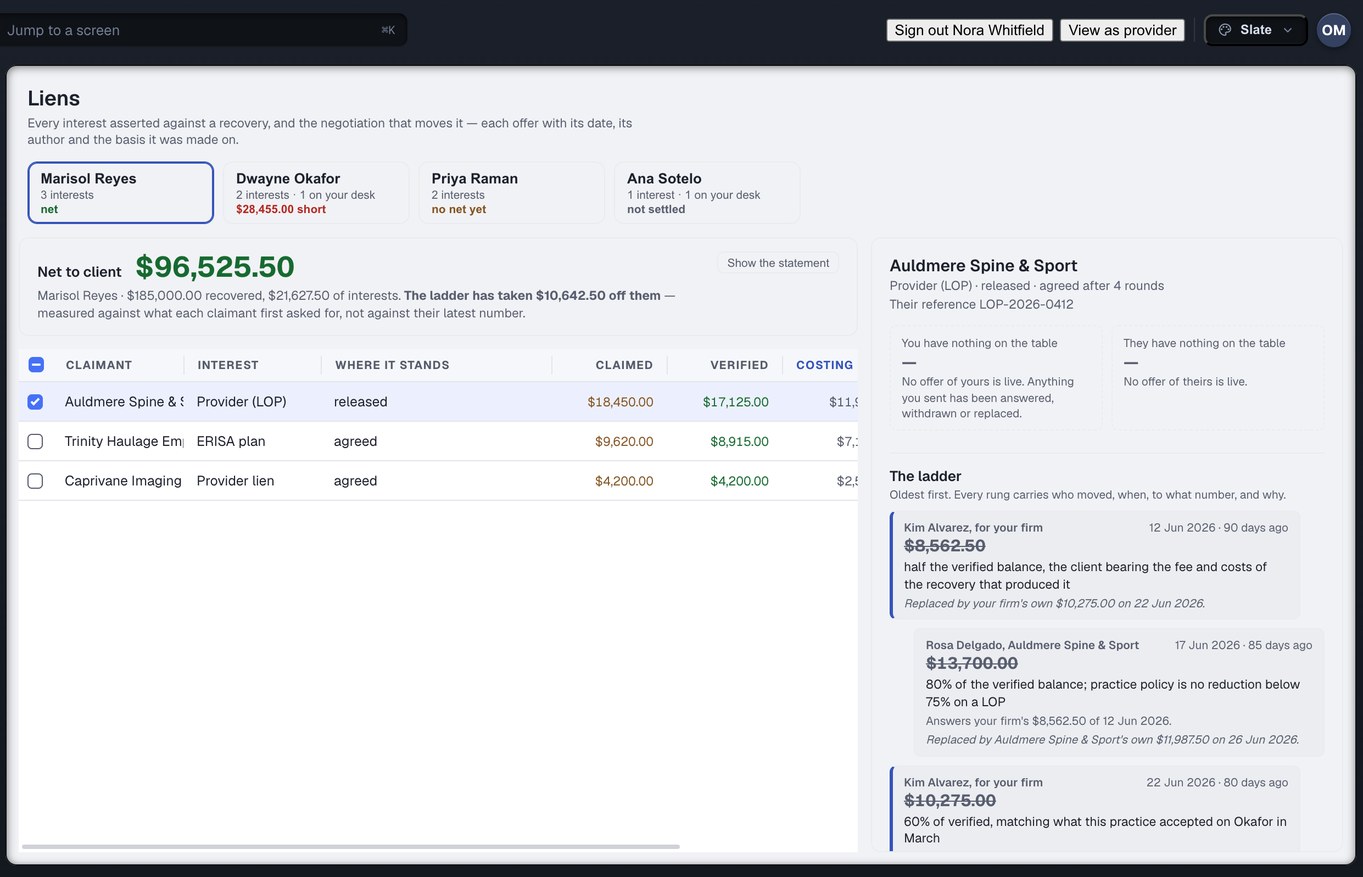
A reduction is an append-only exchange of offers where every rung records who moved, when, to what number, and on what stated basis. “$17,500” is not a position; “$17,500, being the balance less the charges the health plan already paid and a proportionate share of the cost of recovery” is. The product refuses to record an offer with an empty basis, at the one moment that is cheap — while the person typing the number still knows why.
- The lienholder’s opening number is a claim, not a balance. A lien has no single “amount”; what was asserted and what somebody checked are kept apart, and every screen says which one it is showing
- An acceptance names the rung it accepts. When letters cross and the claimant has since posted a worse number, accepting the superseded one is refused, with the replacing rung named
- The clinic reads the same ladder and the same refusal sentences, word for word. Two sides cannot be told different stories about one rule
- No statute is written into the engine. What may be reduced, by whom and to what floor arrives as configuration carrying a reviewer’s name and a date; where nothing is configured for an interest, the product says it has no opinion rather than producing a plausible number
What this means for you: a reduction survives a file review because the reasoning was recorded when it was made, not reconstructed when it was questioned.
“Do not disburse” comes with a list, not a grey button
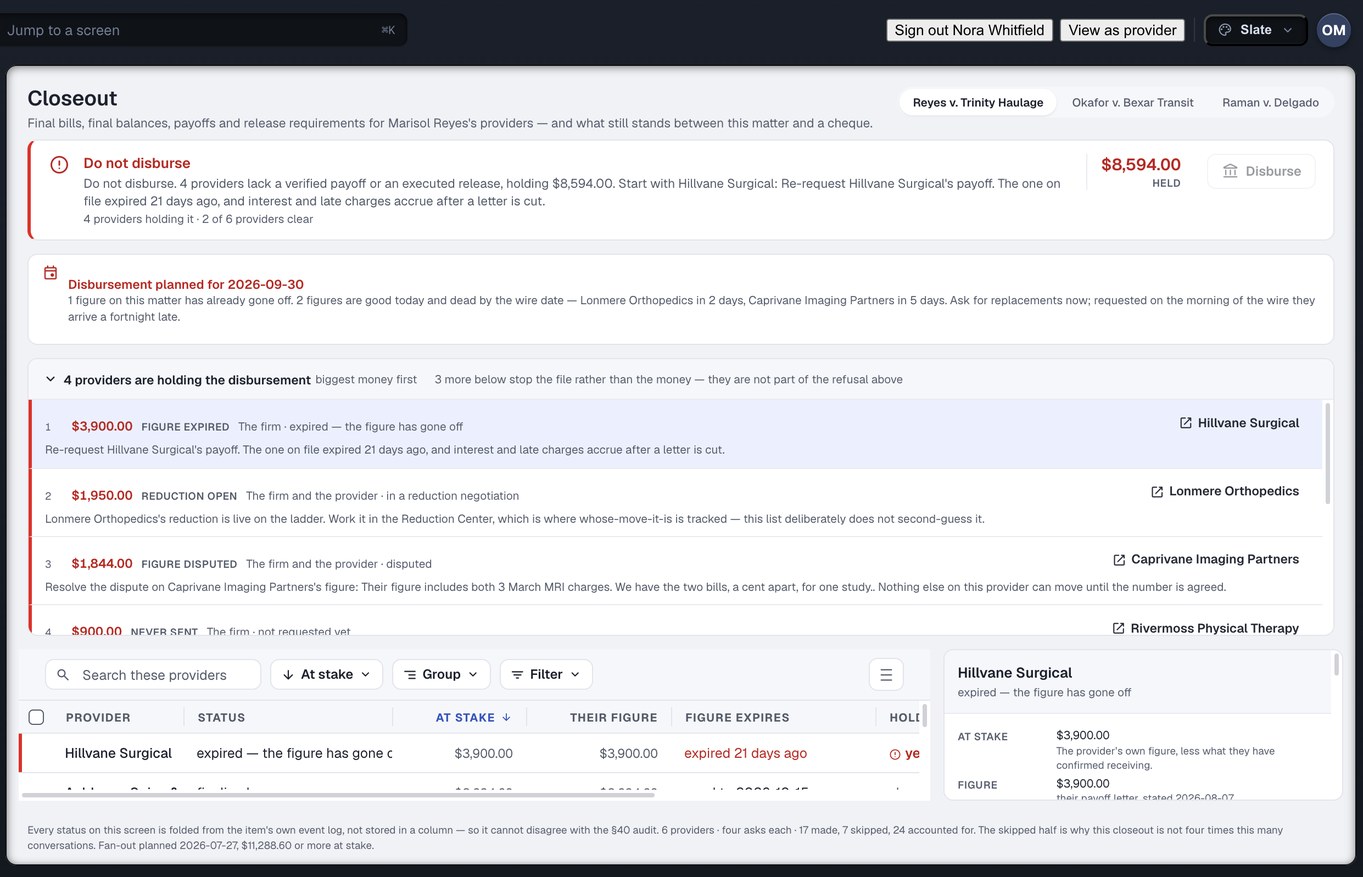
A settlement is one event. What it starts is between three and fifteen conversations with different clinics, each owing four things — a final itemised bill, a final balance, a payoff letter and their release requirements — asked for and tracked separately, so three can finish while the fourth is argued about. “Can we disburse” is true about one day in thirty. On the other twenty-nine the useful answer is which provider, how much is behind them, whose move it is and what the call is.
- At most one hold per provider, in the order the work actually happens, so one clinic never appears three times for one phone call
- A payoff that is good today and dead on the day you mean to wire is its own hold, raised now rather than on the morning of the wire
- A figure that came from a phone call is not wireable, and the hold says so
- A release is not real until the money is confirmed. Sending a payment and the payment arriving are separate facts, and a release cannot be recorded against the first one — that is the file the firm believes is closed and the lienholder believes is unpaid, surfacing as a collection letter to your client months later
What this means for you: a gate that names its reasons cannot be overridden in general. It can only be answered one reason at a time, which is the same thing as doing the work.
Before anyone is retained
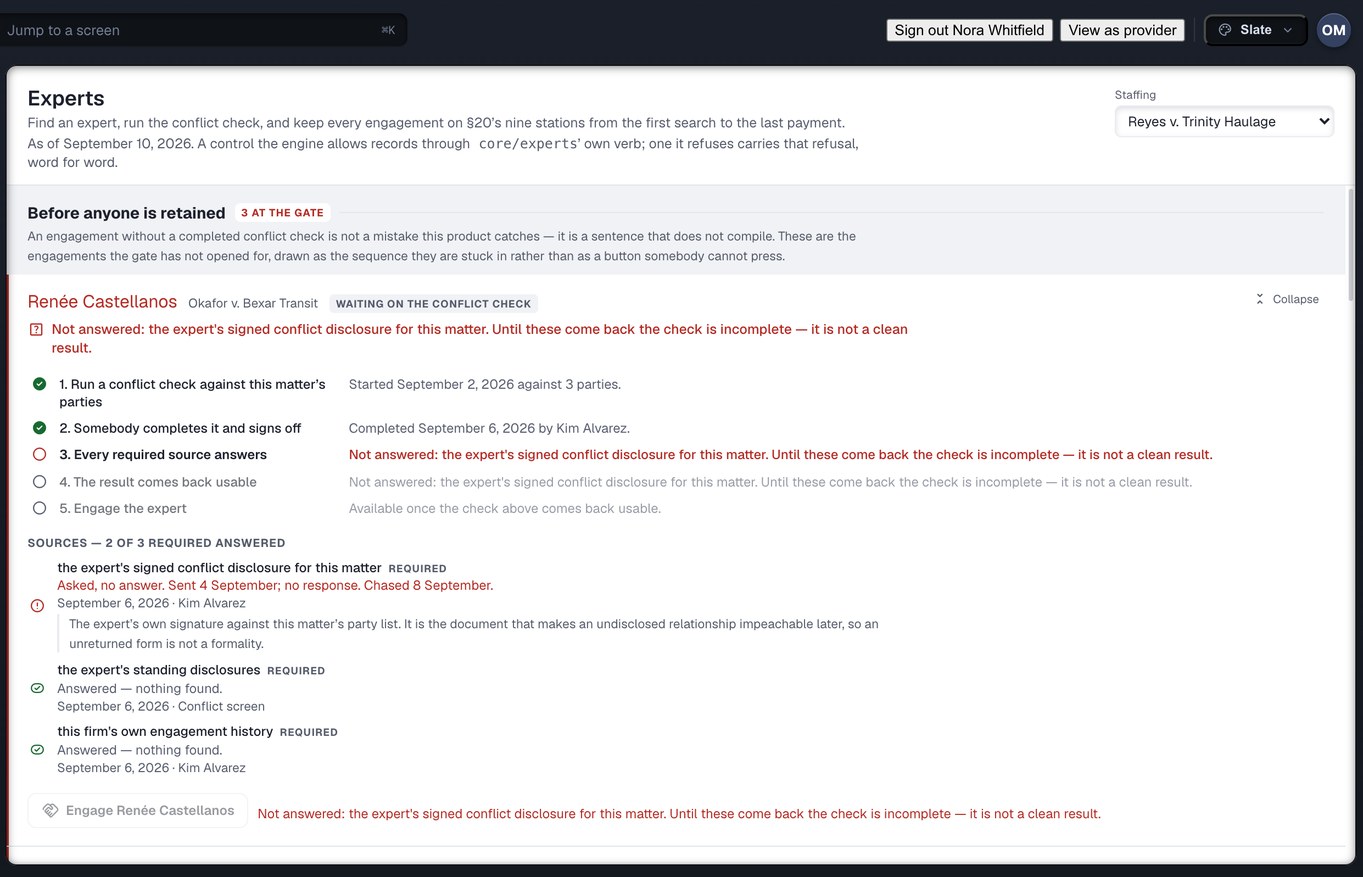
A conflict check you cannot walk past
Every other failure in an expert engagement is recoverable. A conflict found afterwards is not: the expert who examined your plaintiff for the defence two years ago has heard the other side’s theory, and the designation deadline may already have passed. So an engagement record cannot be constructed at all without a conflict clearance attached to it. It is not a warning somebody clicks through at five to six.
- Silence is not clearance. An unreturned disclosure form is “unknown”, and the refusal names which source to go and get
- A consented conflict is recorded as waived, never laundered into clear
- The expert’s standing disclosures are read before anything case-specific, and the sources required depend on the category — a physician is screened against a register an engineer does not appear in
No stars, no win rate, no exclusion rate
Whether an expert is any good is decided by a judge on a Rule 702 motion and by a jury after cross, on a record this software will never see. So the profile carries what you can check — credentials and who checked them, licensure, availability, what they charge, what they have testified in, and your own firm’s history with them — and every asserted fact says who asserted it and whether anyone has confirmed it. Prior challenge rulings are kept one by one, each citable, and never averaged into a number a firm could shop on or an opponent could read into the record.
Nothing on any screen is a stored status
There is no status column in this product. Where a request is, where a lien stands, whether a closeout item clears, whether an affidavit is usable — every one is folded on read from an append-only log of what actually happened: accepted, queried, corrected, part-sent, offered, countered, paid, confirmed. A status field plus a separate audit trail gives you two records that can drift apart, and the one people trust is the one that is wrong.
Nothing in the history is overwritten, so a correction never erases what it corrected. Your screen and the clinic’s are the same derivation, not two copies. And every figure is exact to the cent, rendered to two decimals, on both.
Counted from the build, not from a case study
Facts about what exists. We have no firm outcome figures, no time-saved figures and no testimonials, and this page prints none.
Eight screens you read. The other six are where the requests get sent.
One desk for the whole firm; the attorney and settlement roles simply spend their time on the reading half of it. Every sentence on these eight is derived from the request log.
Requests
Every request the firm has sent and where each one is — with its clock, and whether the wait is on the clinic or on us.
Liens
Every interest asserted against the recovery, the net to client, and the ladder that moved each one.
Closeout
Final bills, final balances, payoffs and release requirements per provider, and what still blocks the cheque.
Dashboard
What needs attention, what is overdue, what was just fulfilled — and a “waiting on us” section, because the delay on a file is as often the firm’s as the clinic’s.
Exceptions
Everything that is wrong across the firm’s book, ranked by what it costs and what it blocks, each row naming whose desk it is on and what would end it. The Exception Center →
Bills & Balances
Every provider’s billed, paid, adjusted and outstanding amount on one ledger — the same ledger the clinic reads, with the firm’s stated reason for every reconciliation on it. Bills and balances →
Experts
Find, engage and pay an expert, with the conflict check that the engagement cannot be built without.
Reports
Spend, fulfilment time, overdue rate and provider performance. A figure the data cannot support says what is missing rather than being estimated.
And the sending half
New request, Providers, Referrals, Discover, Messages and Settings are where your case manager raises the work you read here. The firm side, in full →
Four things this deliberately does not do
Two of these are other Omnis products. Being clear about the edges is how you can trust the middle.
It does not write the demand
Demand readiness is a gate, not a drafter. It tells you whether the specials are final, which bills are backed by paper, which affidavits are usable and what is still on somebody’s desk. The demand itself is written by you, or by the drafting tool you already use.
It does not write the medical narrative
Injury Docs finds gaps in treatment and turns them into records requests. Writing the medical summary out of those records is MedChron, a different Omnis product, and a missing narrative never blocks readiness here.
It is not your case system
It is the exchange with the clinics. Settings is where it connects to the case system you already run, and the affidavit vocabulary — needed, requested, received, defective, corrected — is shared with it on purpose, so a paralegal moving between the two reads one language.
It is not a lien calculator with a statute in it
What may be reduced, by whom and to what floor differs by interest and by jurisdiction, and it moves. The engine checks an ask against reviewed configuration and refuses to say anything where none exists. For an interest whose figure only the claimant can determine, it obtains the number rather than estimating one.
The six that come up first
How do I know the chart is complete for the dates we asked for?
The request carries the ticked materials list and the date-of-service window it was raised with. What arrived is checked against that list, and a request four-sixths fulfilled sits in a state of its own with the two outstanding items named on your screen and the clinic’s. A blank window is shown as “no dates of service stated”, never as a dash.
What happens when an affidavit comes back wrong?
The firm records the defect and what is wrong with it. The request moves to a defective state, the clinic owes a replacement sworn by the records custodian, and their clock runs until it arrives. The corrected copy is a separate state, so the file always knows the first one exists and must not be attached. A defect with no reason written down puts the next act back on the firm, and the screen says so.
Can a paralegal accept a reduction offer without recording why?
No. Every offer and counter must carry a stated basis or it is refused. An acceptance names the rung it accepts, so if the claimant has posted a newer number since the letter in front of the paralegal, accepting the old one is refused with the replacing rung named. The same sentences are rendered on the clinic’s screen, word for word.
Why is the closeout still refusing when the payoff letters are in?
Because a figure that arrived is not a figure that was agreed, a figure from a phone call is not one you can wire against, and a payoff good today may be dead on the date you plan to disburse. Each of those is a named hold with an owner and a next action, and the refusal lists them biggest money first. There is no force-disburse flag, because a gate that can be overridden in general becomes advisory within a month.
Can I engage an expert while the conflict disclosure is still outstanding?
No. An engagement can only be constructed with a clearance attached, and a clearance is only produced from a check whose result is clear or waived. An unreturned disclosure is “unknown”, and unknown is not clear. The screen names the source that has not answered and what to go and get. A consented conflict is recorded as waived rather than passed off as clean.
Does it write the demand or the medical summary?
Neither. Demand readiness tells you whether the file is ready to hand to whoever drafts, and what is missing if it is not. The narrative is what “ready” commissions, so it is tracked but never a blocker. The medical summary is MedChron, a different Omnis product. Injury Docs moves records and the money attached to them.
Bring the file that settled six weeks ago and has not disbursed.
Create your firm account and put one matter through the ladder, the closeout and the readiness check — and read, on one screen, which provider is holding it and whose move it is.
The whole firm desk: Read the firm side → · Reductions in depth: Liens and reductions → · Running a clinic? The provider side →