Raise it once. Then know where it is.
You raise the requests and you chase them. So the builder carries a named list instead of a paragraph, the release is checked against that list before Send will work, and when somebody asks where the Reyes chart is, the answer is a state and a clock — not an email thread you have to open.
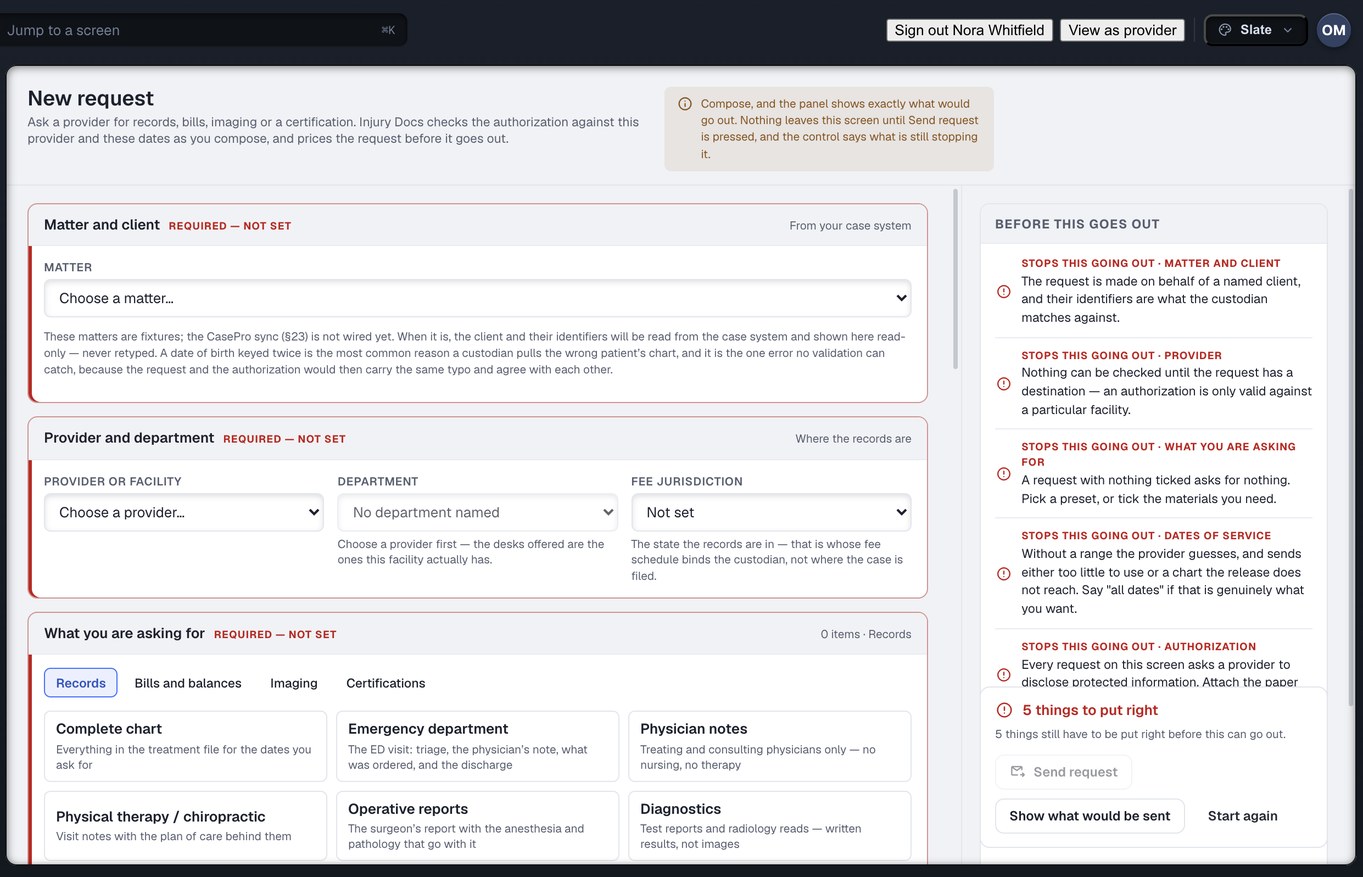
The defect is born in the free-text box
Three things happen to a records specialist every week. None of them is about being slow, and all three start with a request that could not say exactly what it wanted.
“All records” means two different things
To one custodian it is the whole chart. To another it is the last visit. “Billing” is an itemised statement at one desk and a UB-04 at the next. The clinic fulfils what it read, you receive something the attorney cannot use, and nobody finds out until the demand is being drafted.
The bounce arrives after the days are spent
The release names the wrong facility, or the range does not reach the visit, or the client signed with a name only. You learn that on day three, as a fax with one sentence on it. Then you ring the client for a second signature, and the request starts again from nothing.
“Where is the Reyes chart?” is answered by reading a thread
An email has no state, no owner and no clock. The answer lives in whichever mailbox sent it, and when that person is out, nobody knows whether the clinic has it, has bounced it, or has sent half of it. The attorney asks you, and you open the thread.
Eight mechanisms, and six of them run before you press Send
The builder is where most of the product lives for this desk. What follows is what it does with a request while you are still composing it, and what happens to that request after it leaves.
Thirteen asks, one builder
Everything you ask a clinic for is the same shape — ask, then find out later whether it came — so there is one request here and the thirteen named asks are types of it. Records, itemised bills, ledgers, current and final balances, payoffs, affidavits, certifications, case status, no-longer-represented, MedPay and PIP, and imaging all raise from four tabs on one screen.
- Twenty-eight presets across Records, Bills and balances, Imaging and Certifications
- Picking a preset sets the request type as a consequence — there is no second picker that can contradict it
- Every one of them can be escalated, reassigned and handed over when you are out — an email thread cannot
What this means for you: one screen to raise from, and one screen to find any of them on afterwards.
The request carries a list, not a paragraph
Thirty-seven named materials, each one a thing a records clerk can go and find without asking a second question, and each with a one-line note beside its tick saying what it is and where it differs from what a reader might assume. “Operative reports: dictated by the surgeon, frequently filed days after the procedure.” A preset fills the ticks in and then stops existing. The ticks are the request.
- “Complete chart” is fifteen named ticks, and it says on the screen that it does not include prior history
- Change one tick and the label becomes “Custom selection”, because a request labelled Complete chart that is two ticks short lies to the clerk reading it
- Behavioural-health notes and substance-use treatment records are in the catalogue and in no preset at all — ticking one is a deliberate act, and the release is checked for it the moment you do
What this means for you: the preset is what makes it fast. The list is what makes what comes back usable on the day it arrives.
Dates of service are a field, and blank is not “all dates”
A request without a range makes the clinic guess, and it sends either too little to use or a chart the release does not reach. So the window is a required field with three honest answers: a range, “all dates” ticked on purpose, or nothing stated — and nothing stated is shown as exactly that, never as a dash a reader would take for no restriction.
- January’s ER visit and June’s therapy course at the same clinic are two requests, not a duplicate — the window is what tells them apart
- When one side of a comparison is blank, the duplicate check says it cannot tell, rather than guessing either way
- The prior-records preset tells you to end the range the day before the injury — a prior-records ask that runs to today is just another chart pull, and it tells a defence expert you went looking
What this means for you: the difference between a blank and “everything” is a client’s whole medical history. The builder will not resolve it for you.
The release is checked against the request — and a blank is not a blanket
Not a character of an authorisation is ever changed by the software: it is a document the client signed, and a trimmed name or a filled-in provider line is a document nobody signed. Instead the paper is read against this request — this facility, these dates, these materials, this client — and every defect comes back as a sentence naming the act that fixes it and whose desk it is on. The grantee line has three readings. A page that names a specific practice is checked against the practice you chose. A page that grants to “any and all healthcare providers” is read as granting to that class, in the words on the page, verbatim. A page whose line names nobody blocks the request, and the remedy says a blank cannot be filled in here.
- Twenty-eight findings, two severities — blocking or warning. There is no third level for things nobody reads
- A release that covers part of the range is not a refusal: the finding hands back the dates that are covered and tells you to have that part sent now while the client re-signs for the rest
- A clinic that only acts on its own form is a fact on its provider record, and the check says so before you send — however good your release is, theirs is the one they will read
What this means for you: the bounce you would have received on day three is on the screen on day zero, with the fix written beside the field.
Five things stop it going out, and the panel names them
Matter and client. Provider and department. What you are asking for. Dates of service. Authorisation. The panel beside the builder lists which of the five is still missing, in a sentence each, and the Send control stays refused until the count reaches zero — it does not grey out, it tells you why. A control called “Show what would be sent” lays out exactly what the clinic would receive.
- The department is suggested from the preset and marked as a suggestion until you touch it — a chart request goes to Health Information Management, a UB-04 to the billing office, films to Radiology
- The fee jurisdiction is the state the records are in, because that is whose schedule binds the custodian — not where the case is filed
- The request is priced before it goes, and where the price cannot be known it says so rather than printing a zero
What this means for you: the request accepted by a desk that cannot fulfil it, and forwarded a fortnight later by somebody with no reason to hurry, is the cheapest three weeks to lose. The builder asks the routing question first.
Twenty-one states, including the two everybody else collapses
A request moves through a named lifecycle rather than a status somebody types, and on the Requests screen every state is a phrase: with the provider, opened by the provider, being worked on, waiting on a correction, ready, waiting on payment, partly sent — the rest is still owed, delivered, downloaded, closed. Two of those are the ones other systems fold away. “Delivered” happens twice and means two different things — the request reaching the clinic, and the documents reaching you — so they are two states with two clocks. And a chart that arrives in three batches has a state of its own.
- Partly sent keeps the request open and the clinic’s clock running on the remainder — you are never told the records arrived when some of them did not
- “The rest does not exist” is a real ending with its own state, so a row is never chased forever
- An affidavit that comes back signed by the wrong person is “came back defective — not usable yet”, not fulfilled, and the corrected one is kept apart from the first so the wrong one is never the one attached to a demand
What this means for you: “where is my request” has a true answer at every point, and you can escalate on a state. You cannot escalate on an email nobody replied to.
The clock stops when the delay is ours
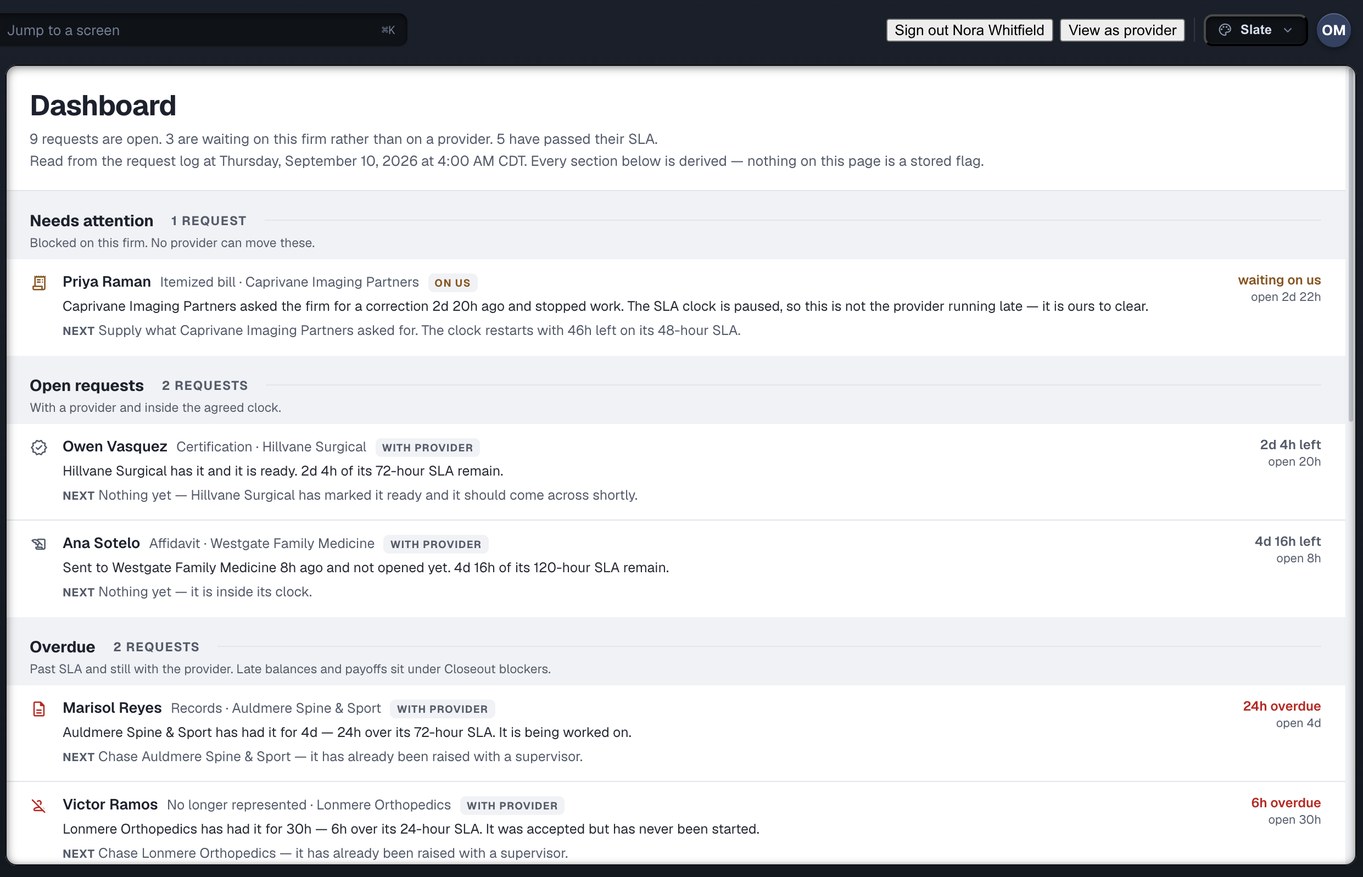
When a clinic sends a request back for a corrected release, its clock pauses until you supply one. On Requests that row does not count down; the SLA column reads “waiting on the requester”. On the Dashboard it sits in Needs attention under the words “blocked on this firm — no provider can move these”, with the sentence that put it there and what to do next. The wall-clock age is still shown, because it is always a fair question. It is simply not what the clinic is scored on.
- The escalation ladder is five rungs at fixed fractions of the agreed turnaround: a reminder at half, the assignee at four-fifths, a supervisor when it is due, network operations at one and a half, the firm alerted at double
- A four-hour rush and a thirty-day chart pull escalate at the same relative points without a second table
- Tell the clinic this in the first conversation. It is the reason they answer this queue before the fax pile
What this means for you: you stop ringing a clinic to chase your own missing signature — which is the single most common way these relationships go bad.
When a clinic does not answer, the chase has a ladder too
Not every clinic is on Injury Docs. Where one is not, the request is worked for you by Omnis’s own retrieval desk — by fax, portal, email, post or telephone — and you still read one vocabulary. A fax is retried on a working day’s cadence up to four times, because that is the observed shape of a hospital records room. Post is sent once, because a second envelope to an address that swallowed the first teaches nothing. And posting a letter is never recorded as delivering a request: the row stays at “not sent yet” until something proves the clinic has it.
- The chase climbs from the agent to a retrieval supervisor, to telephoning a person with authority, to fixing the endpoint itself — and then to you, because the next step may be a subpoena rather than another polite ask
- Six named reasons a task is declared unfulfillable — no records exist, wrong facility, a requirement they will not act without, every channel exhausted, the provider refused, a partner declined — so “we gave up” always says why
- None of those attempts lands on a clinic’s record. A county hospital that has never heard of us is not scored on the performance of our fax line
What this means for you: “did the hospital ever get our request” is answered with a transmission report, or with an honest “we posted it on the 3rd and have no confirmation” — never with the same green tick for both.
Counted from the build, not from a case study
Facts about what exists — not claims about what it will save you. We have no firm outcome figures yet, and we will not print a guess.
Three screens you will have open all day
The firm’s rail has fourteen destinations. These are the three a records specialist lives in, captured from the build with demonstration data.
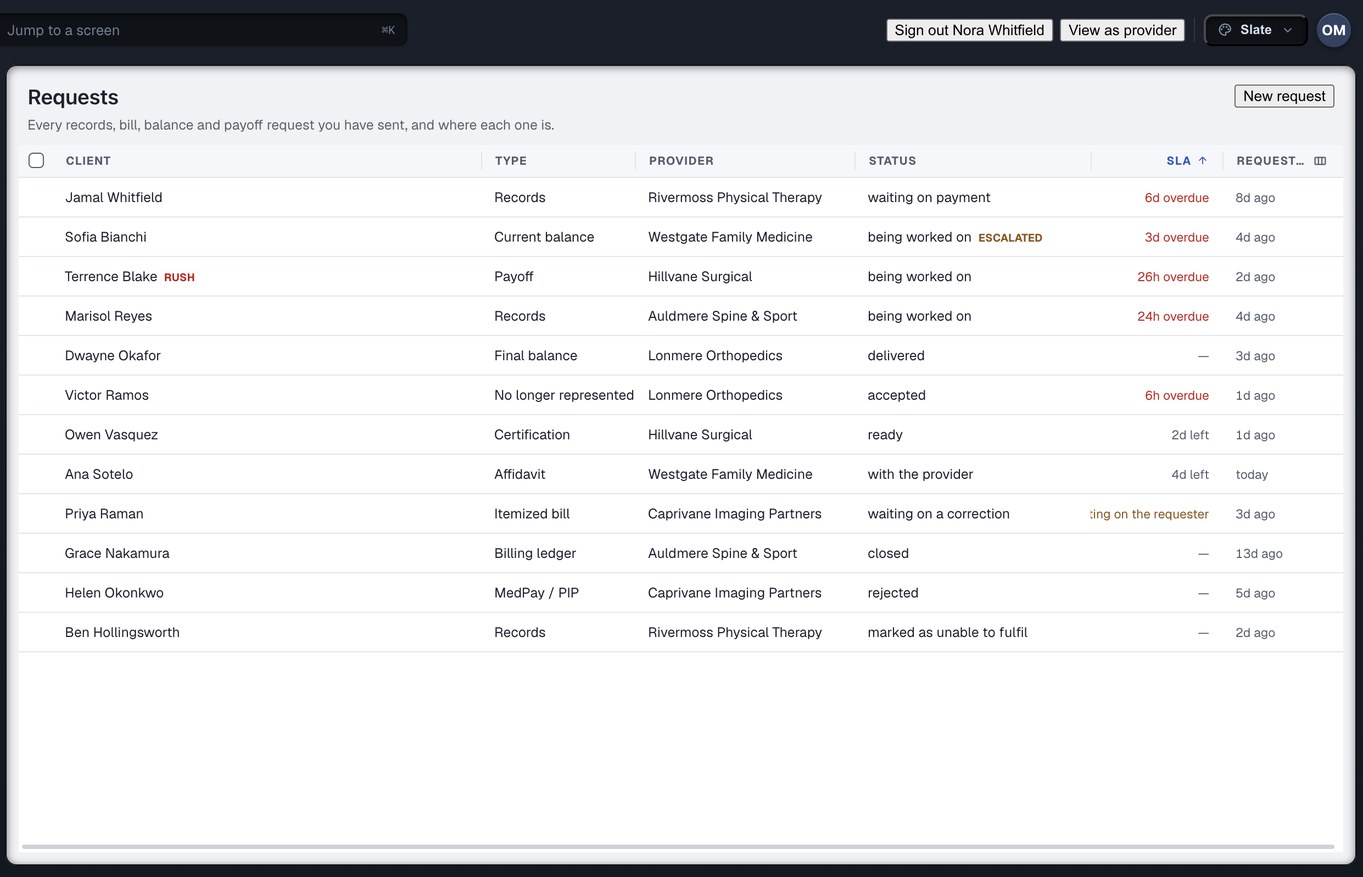
Requests
Every ask you have ever raised and where each one is. The columns answer, without opening anything: what is it, who has it, where has it got to, and is it late. The SLA column has three answers, not two — time left, overdue, or waiting on us — because “overdue” on a request that is blocked on our own paperwork would be a lie.
Dashboard
Most dashboards tell you how many and stop. This one opens with a sentence — nine open, three waiting on this firm rather than on a provider, five past their turnaround — and every row underneath carries the reason that put it there and what to do next. Nothing on the page is a stored flag; it is read from the request log each time.
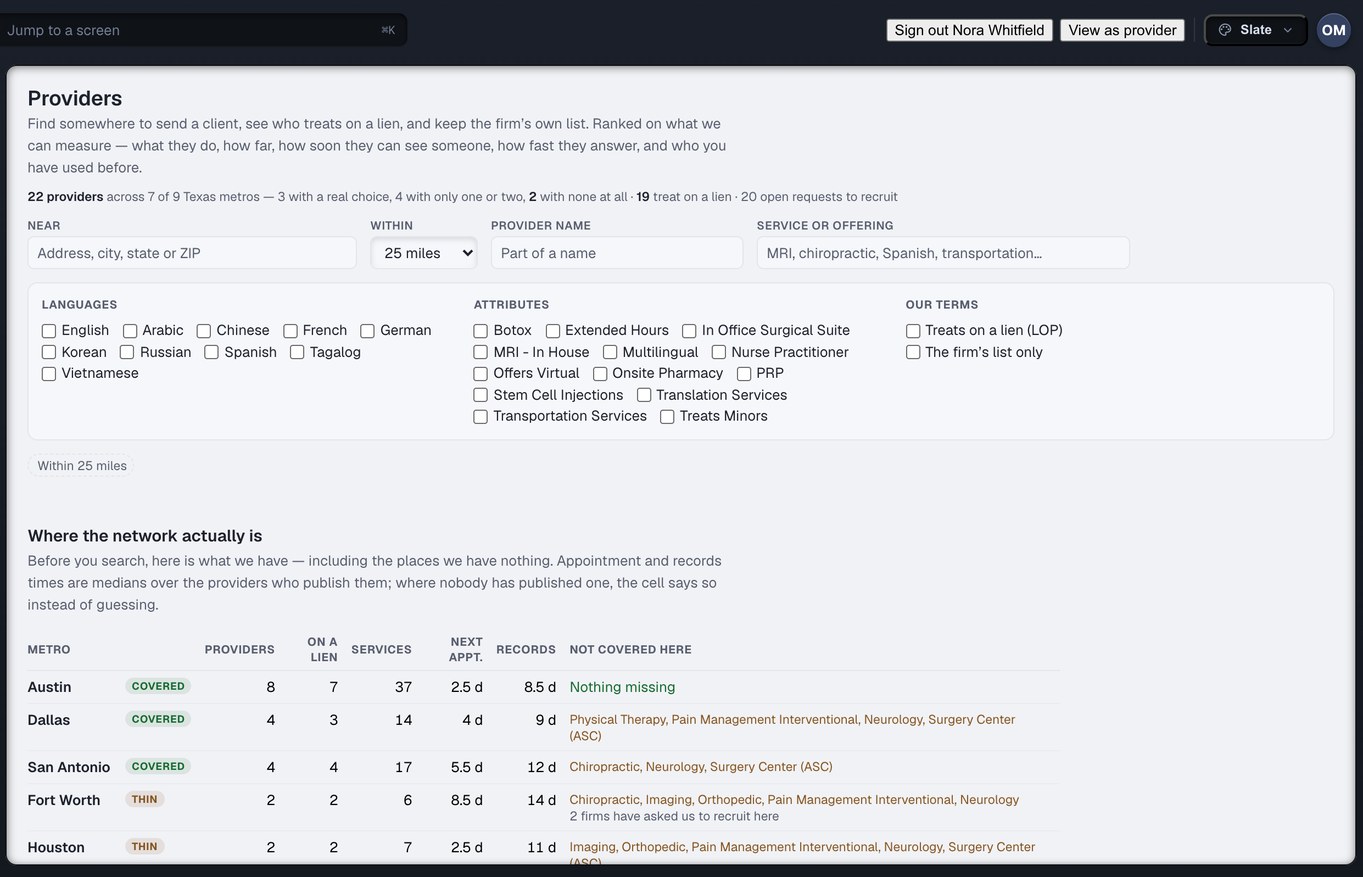
Providers
Where to send a client, who treats on a lien, and the firm’s own list. Before you search, it shows where the network actually is, metro by metro — including the places it has nothing, and which specialties are missing there. Appointment and records times are medians over the providers who publish them; where nobody has, the cell says so instead of guessing.
And the rest of the firm’s rail, as it touches this desk
Discover
Find a provider, or find where a client treated, and learn whether we can reach them and what it costs to order — before you send. Four answers, and the fourth is the honest one: no route we can stand behind.
Exceptions
Everything that is wrong across the firm’s book, ranked by what it costs and what it blocks, with whose desk it is on and what would end it. A late request that is also missing its bill is one row, not three. Read about the Exception Center →
Messages
Every thread with a provider, attached to the request it belongs to and sharing its clock. No orphan email threads, and no thread whose request nobody can find.
Referrals
Send a client to a provider and track the appointment through to seen. For the intake desk, this is the other half of day one.
Bills & Balances
What every provider billed, was paid, adjusted and is still owed, on one ledger the clinic reads too. The bill you asked for lands here when it arrives. Read about bills and balances →
Reports
Spend, fulfilment time, overdue rate and provider performance — each figure with its denominator in words, and each report the data cannot support saying what is missing rather than being dropped.
The release you get signed on day one decides the next ninety
Most of the defects the records specialist fights in month three were written into the authorisation in week one. The same check that runs in the builder reads the paper the way a custodian will, so intake can see the bounce before the client leaves the room.
Four things the check will ask of every release, in the order a records clerk asks them. Each one, missing, is a named finding with the fix beside it.
Create your firm accountFour things this deliberately is not
Each of these is a real product somewhere — two of them are ours. Being clear about the edges is how you can trust the middle.
Not your case system
You choose the matter, and the client and their identifiers come with it — nothing about the client is keyed a second time into the request, because a date of birth typed twice is the one error no check can catch. The matter lives where it lives today. The request is what goes to the clinic.
Not the medical narrative
Injury Docs moves the records and the money attached to them, and it finds the gaps in treatment that need a request raised. Writing the medical summary out of those records is MedChron, a different Omnis product.
Not practice software for the clinic
The clinic side of this exchange is a work queue for legal requests. Scheduling, clinical notes and encounter documentation are CarePro, a different Omnis product. We keep them apart so neither has to pretend to be the other.
Not a replacement for the clinic’s fax line
A clinic that is not on Injury Docs still gets its request the old way — worked by the retrieval desk by fax, portal, email, post or telephone. What changes is what you see: one state, one clock, one record of every attempt, and a plain statement of whether the clinic has been proven to have it.
The six that come up first
Our release says “any and all healthcare providers”. Does that work?
Yes, and it is read as exactly that — a grant to a class, in the words on the page. No provider-mismatch finding can arise, because there is no facility the page excludes. What is recorded on the row is that the request proceeded on a blanket instrument rather than on paper naming this clinic, so “which kind of paper did this rest on” stays answerable later. A clinic that only acts on its own form still bounces it, and the check tells you that before you send.
The release covers only part of the dates we need. Do we wait for a new one?
No. The finding hands back the window that is covered and tells you to have the clinic send that part now, while the client signs for the rest. The request then sits in a state of its own — partly sent, the rest still owed — with the clinic’s clock running on the remainder. It is not marked done and it is not left untouched.
Does every request need a date range?
It needs an answer. A range, or “all dates” ticked on purpose. Two blank boxes are not a range and the builder counts them as one of the things stopping the request going out — because without one the clinic guesses, and sends either too little to use or a chart the release does not reach.
Can I ask for the complete chart in one click?
Yes — and the click puts fifteen named ticks on the screen, which you can read and change. The preset says on its face what it leaves out: prior history, which is its own ask with its own advice on the range, and behavioural-health or substance-use records, which need their own release and are in no preset at all.
Can a records request carry “and certified by the custodian”?
Not yet. Certification and affidavit are request types of their own, raised alongside the records request rather than attached to it. That is how the mailboxes it replaces already work, so nothing is lost — but we would rather say it plainly than have you look for a tick that is not there.
What happens when a clinic simply does not answer?
If the clinic is not on Injury Docs, the retrieval desk works it — a fax up to four times on a working day’s cadence, post once, then a supervisor, then a telephone call to somebody with authority, then a fix to the endpoint itself. When that ladder runs out you are told, because the next step may be a subpoena, and the reason it ended is one of six named ones rather than “no response”.
Bring the request that bounced.
Create your firm account and raise the one that came back with a sentence on it. See the same sentence on the builder before Send, with the fix written beside the field — and then see where the request is, at every point, without opening a thread.
Records requests in depth? Read the records page → · On the clinic side? Read the provider side →