The firm raises the request. The firm owns the record.
Eleven roles, each a set of grants you issue and can read back. A request that belongs to your firm even while a clinic is working it. Reports measured from the log rather than typed into it. And a record with no edit and no delete anywhere in it — so the question nine months from now is answered by reading, not by remembering.
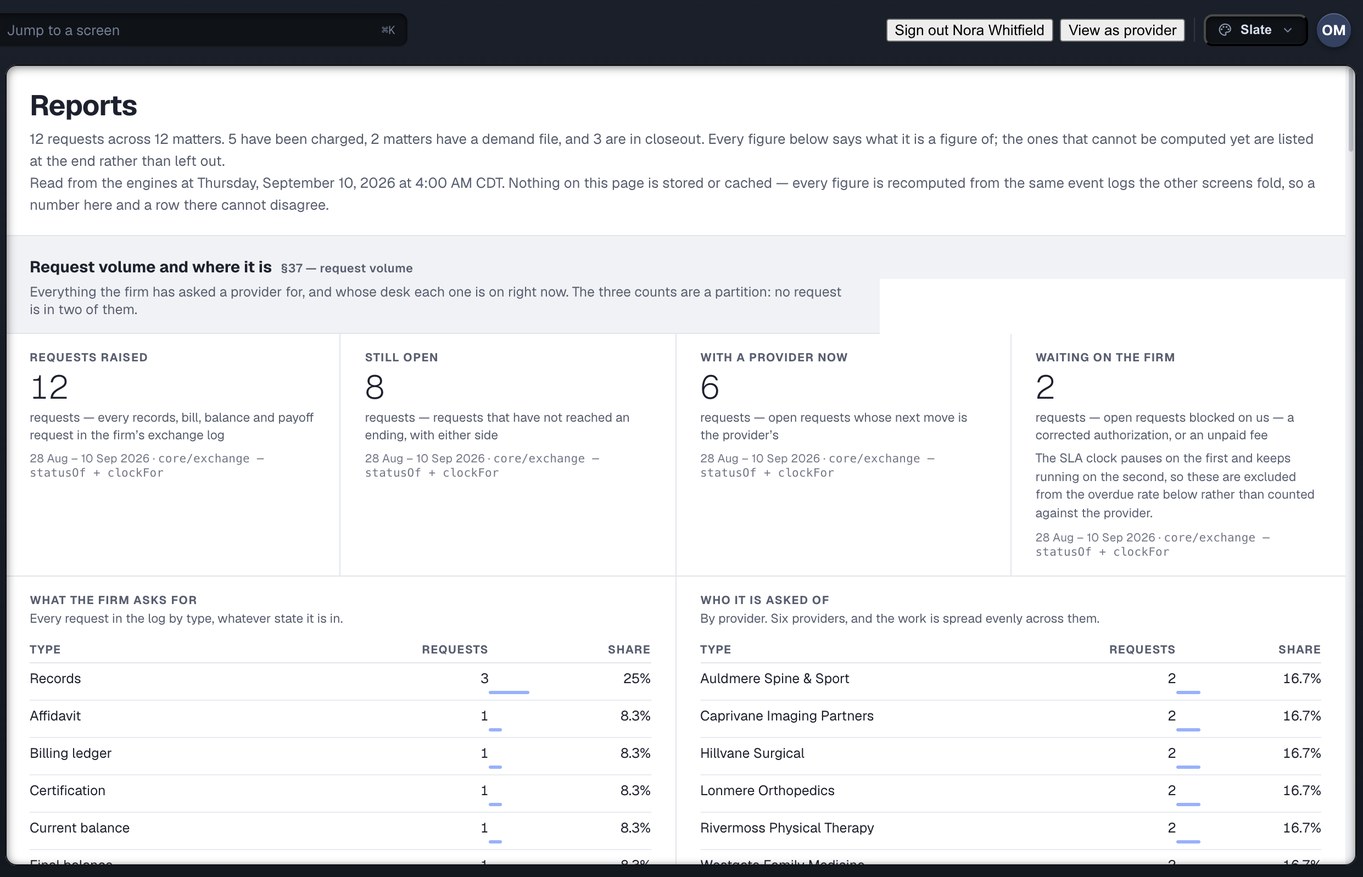
The Reports screen, captured from the running build, 24 September 2026. Demonstration data — every name, matter and figure is a fixture, not a real client, clinic or balance.
Three questions the systems firms use today cannot answer
None of them is about the paralegal. All three are about the firm, and all three land on the owner’s desk eventually.
Who at this firm can see the money?
In the systems firms use today, adding a colleague is a ticket to somebody else’s help desk. There is no role, no permission surface, and no way to switch off a leaver’s access on the afternoon they leave. Everyone assumes the medical coordinator can see the settlement arithmetic. Nobody assumes read-only is a poor privacy control. Both are wrong, and both are expensive.
What did the clinic keep after the case closed?
An email carrying a release is a copy the recipient holds forever. Nothing about it expires, nothing says which request it was for, and nothing at your end can take it back. Three years later the vendor the clinic used still has the chart, and whatever let them in looks exactly like an employee’s access.
Which of these two records is true?
A status column and a separate audit table are two records of one fact. They can disagree, and when they do, the one people trust is the one that is wrong. A report built on either is a number with a shape rather than a measurement, and the meeting about why a case is eight months old is held from memory.
What the firm owns, and how it keeps hold of it
Injury Docs is one system that the firm and the clinic both open. For the owner, the interesting part is what stays the firm’s when somebody outside the building is working on it.
A request belongs to the firm
The firm raises the request, so the firm owns the row. When it is delivered, the delivery itself issues the clinic a delegation: a grant scoped to that one request, with its verbs named, and an expiry that is not optional. The clinic can open it, accept it, work it, invoice it and fulfil it. It cannot pay against it or negotiate on it, because those are the firm’s decisions.
- The grant rides inside the delivery event, so a delivery that grants nobody anything is not something that can be written down
- It is held by the clinic as an organisation, not by a named clerk — the way a fax is picked up by whoever is at the machine, and narrowed from there by the clinic’s own roles
- Only the tenant that owns a record can issue a delegation on it, so a clinic cannot pass your client’s file on to a vendor you have never heard of
What this means for you: the clinic works your request under terms you issued, on a clock you can read, and the door closes on a date.
Eleven roles, each a set of grants
Owner, Admin, Attorney, Case Manager, Medical Coordinator, Records Specialist, Settlement, Accounting, Intake, Read-Only and Custom. A role is a template; a grant is that template placed on an office, a team and a matter. Every grant names exactly one tenant, and there is no grant, role or delegation that can name two — so a read across firms is not something a check refuses, it is something nobody can write down.
- Money is its own axis, on a ladder from none to full. A Case Manager reads the bill total but not the fee schedule behind it; a Records Specialist reads the schedule, because they approve what the firm pays per page
- Admin runs the account and cannot move money. Accounting moves money and cannot configure the account. One person doing both holds both grants, and both are visible in the people list
- There are no deny rules. Every refusal is an absence, and an absence has a name and an owner, so the sentence says who can fix it
- Read-Only can look and cannot download, export or print. Custom starts with nothing and is built up axis by axis, so a mistake is a missing permission somebody reports within the hour rather than a surplus one nobody reports at all
What this means for you: what a person can do is a list you can read on a screen, not a title you have to interpret.
Reports are measured, not entered
Spend by provider and by request type, fulfilment time, overdue rate, records completeness, closeout cycle, provider performance, request volume, balances and liens. Nothing on the page is stored or cached. Every figure is recomputed from the same event log the other screens fold, so a number here and a row there cannot disagree.
- Every figure carries what it is a number of, in words, and the window it covers — never a bare percentage
- Time a clinic spent waiting on your firm is excluded from its overdue rate rather than counted against it, and the dashboard has a “waiting on us” section for the same reason
- A metric the data cannot support is listed with the rest, saying what is missing and what would close it. Omitting it would teach you that you are looking at your whole practice
- Spend is four figures, not one: raised, refunded, net and settled. A screen that draws one and calls it spend is picking a side of an argument you did not know was happening
What this means for you: the partner’s question — why is this case eight months old, and on whose desk — is answered from the log rather than from a meeting.
The preferred network belongs to the firm, not to a login
Your firm’s list of providers is kept in the firm’s name, and every entry records who added it and when. A new hire starts with the firm’s years of knowing who is good to work with, not an empty list. When somebody leaves, that knowledge does not leave with their password.
- Providers are ranked on what can be measured — what they do, how far, how soon they can see someone, how fast they answer, and who you have used before. Nothing moves because anybody paid for it to move
- Coverage is derived from the facilities actually in a metro. There is no hand-kept “covered” badge that goes on saying so after two providers churn
- Two spellings of one clinic are never merged on a score alone. The system may say “probably the same” as loudly as it likes; collapsing them takes a named human, and the merge records who decided
What this means for you: the network is an asset of the firm, held in the firm’s name.
Settings: the firm, its people, and what it is connected to
Who is here, what each of them may do, which office they sit in, which teams span offices, who approves a charge above which amount, who is told when, and how the app would connect to the case system you already run. Six questions asked by six different people on six different days, on one screen.
- Offices are a tree and teams cross it. A medical-records pod that spans every office is expressible, because the two are kept separate rather than collapsed
- Approval thresholds and the roles that may approve have exactly one home, so the settings screen and the payment rail cannot disagree about who may release money
- The case-system section names the objects that would move and in which direction — clients and matters in, request status and balances back out, several both ways. In the current build it describes that connection rather than making it, and says so in a sentence rather than a grey switch
What this means for you: the answer to “who can do what here” is on a screen you own, not in a ticket to somebody else’s help desk.
The record: append-only, hash-chained, and honest about what that proves
There is no update verb and no delete verb. Not unused — absent from the interface, so there is no code path to audit and nothing to forget to check. A status is derived from the log every time it is read and never stored. A human correction is a new event that says what was corrected, exactly as a corrected authorisation is a new document rather than an edit of the old one.
- Each record carries the digest of the one before it and its own digest over its bytes. Change a field, remove a record or insert one, and every link after it breaks
- That makes tampering detectable, which is the property a custodian can testify to. It is not a signature: it proves the log is internally consistent, not who wrote it, and a party who rewrites the whole log from the first record forward produces a consistent log
- A truncation is not detected at all — a prefix of a valid chain is a valid chain — and countersigning the head to somewhere the writer does not control, which is what would close both gaps, is not built
- The audit trail is a projection over the same log, plus a journal for the things no module records — who signed in, who opened what, who was refused — and every line says which of the two it is. It is never a second copy
What this means for you: when a balance is disputed, the argument is about what the record says, not about whether the record is the record.
Counted from the build, not from a case study
Facts about what exists — not claims about what it will save you. We have no firm outcome figures yet, and we will not print a guess.
Three screens the owner opens, and what each one is derived from
Every capture below is from the running build. Every name, matter and figure on them is a fixture.
Dashboard — the section that reports on you
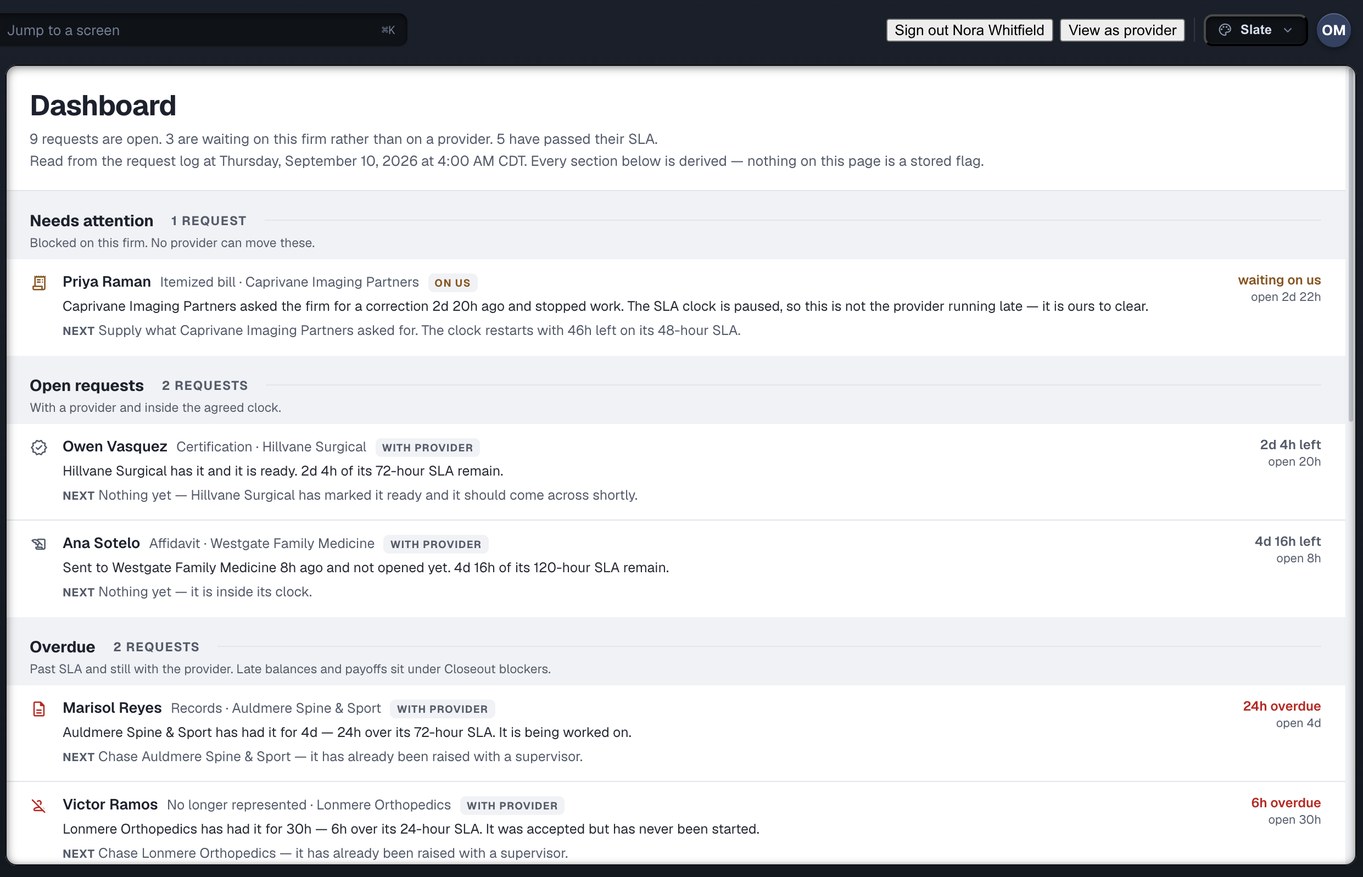
Nine requests open, three of them waiting on this firm rather than on a provider. The “needs attention” block at the top is the requests blocked on your own desk, because most portals only show you what your vendors owe you. Each row says what happened, what is next, and whose job that is.
The page says so itself: every section is derived, and nothing on it is a stored flag. The clock on a request that is waiting on the firm is paused, so the provider is not shown as late for a delay that is yours.
Providers — where the network actually is
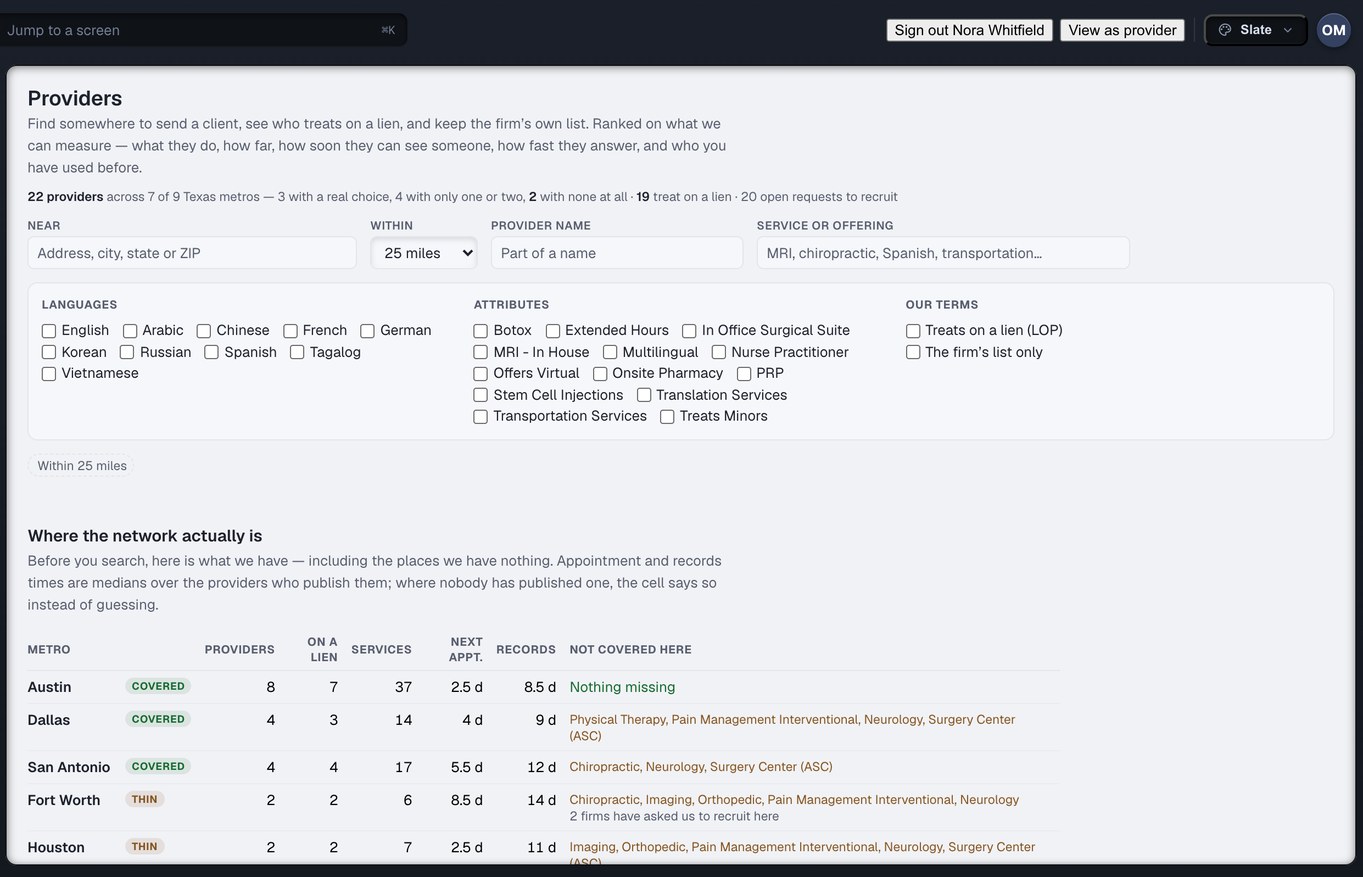
Before you search, the screen tells you what it has — including the metros where it has nothing, and which services are missing in each. A thin metro says so, and says how many firms have asked for recruitment there. Appointment and records times are medians over the providers who publish them; where nobody has, the cell says so instead of guessing.
“The firm’s list only” is one filter among the rest. It is the firm’s list, not the signed-in person’s, and each entry on it carries who added it.
Settings — people, roles, approvals, the case system
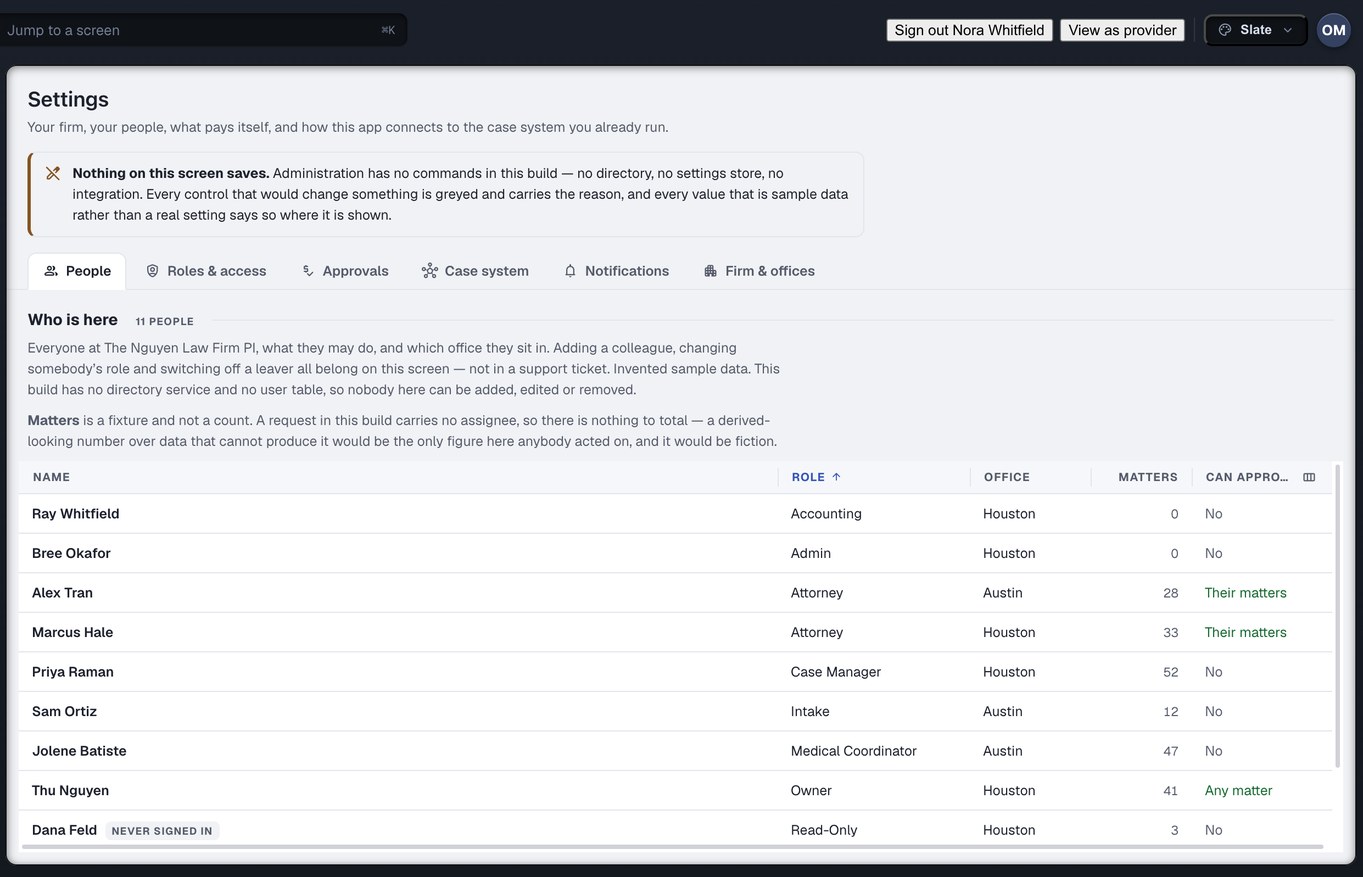
Six tabs: People, Roles & access, Approvals, Case system, Notifications, Firm & offices. The people table answers the question it is usually opened with — who is our records specialist — by sorting on role first, and its last column says in plain words what each person may approve.
On the web app the People tab is live: an Owner or Admin invites a colleague with a one-time link, the colleague chooses their own passphrase, and somebody who has left is removed and signed out within seconds. The rest of Settings is not connected to real accounts yet, and on the web it is not shown rather than shown with sample data. The capture is the desktop build’s Settings, which draws a sample firm and says so, for the same reason the reports list their gaps.
Agents act on a leash you can read
An agent acts at one of five levels: Observe, Recommend, Draft, Execute with Approval, Execute Automatically. The floor is set by the effect of the act, not by the agent’s job.
An observation may exist at Observe. A suggestion needs Recommend. An artefact — a classification, an unsent draft, a summary — needs Draft. Anything that changes a record needs Execute with Approval. Below the floor the output is not produced and then held back; it is not produced at all, so there is no hidden artefact for somebody to surface later.
An agent cannot approve its own act
An approver is a person — not an agent, not a service account. The approval is tied to one proposal, so approving the cheap act cannot be replayed onto the expensive one. An agent may not act on an override ticket either; a person raised that door and a person walks through it.
Nine things an agent may do. Five it may not.
May: classify and route requests, flag a defect, draft a message, summarise a provider’s response, suggest the requests that are missing, extract document metadata, analyse records, report an anomaly. May not: invent a medical event, alter a signed authorisation, bypass permissions, approve a payment, or make a clinical determination. There is no “send” and no “pay” on the list, because there is no way to say them.
The act and its audit line are one value
Nothing returns an act without its record, on success or refusal. The record says what the agent read — a document, a version, a page — and never what it said. Execute Automatically is the only level with no person in the loop, so it is the only one where confidence decides anything, and the bar is the firm’s to set rather than a constant somebody edits.
Four things this deliberately is not
Two of these are other Omnis products. The other two are claims it would be easy to make and would not be true.
Not practice software
Injury Docs raises requests, moves records and keeps the money attached to them on one ledger. Scheduling, clinical notes and encounter documentation on the clinic side are CarePro, a different Omnis product.
Not a medical-summary product
Injury Docs finds the gaps in treatment and turns them into requests. Writing the medical narrative out of the records that come back is MedChron, a different Omnis product.
Not a signature
The hash chain makes tampering detectable. It does not prove who wrote the record, and a whole log rewritten from the first record forward is a consistent log. Saying otherwise would be the kind of sentence this site exists to stop.
Not a second copy of anything
There is no status column beside an audit table, no cache beside the report, no per-user copy of the firm’s list. One log, folded wherever it is read. Two screens cannot disagree, because there is only one derivation.
The six that come up first
Can our administrator move money?
No. Admin runs the account — people, offices, teams, settings — and cannot pay or refund. Accounting moves money and cannot configure the account. A firm where one person genuinely does both gives that person both roles; the two grants combine, and both are visible in the people list rather than hidden inside a widened title.
What does the clinic see of our file?
The request you delivered, and nothing else. The delegation a delivery issues is scoped to that one request, names its verbs, and expires on a date. The clinic can open, accept, work, invoice and fulfil it. It cannot pay against it or negotiate on it, and it cannot pass it on — only the tenant that owns a record can issue a delegation on it.
Can somebody at Omnis read our records?
Not by holding a role. Omnis roles are grants in Omnis’s own tenant and reach Omnis’s own records. Reaching a customer’s tenant takes one of two visible things: a delegation the customer issued, or an override ticket that leaves a record whether it succeeds or fails. Only three Omnis roles may hold such a ticket, and the two verbs it unlocks are in no role template anywhere.
Can a record be edited or deleted?
No. There is no update verb and no delete verb on the log — they are absent from the interface, not merely unused. A correction is a new event that says what was corrected. The status you see on any screen is derived from the log at the moment you read it, and never stored anywhere it could drift from the history.
Is the hash chain proof of what happened?
It is proof of internal consistency, which is what makes tampering detectable and what a custodian can testify to. It is not a signature and it does not prove authorship. A rewrite from the first record forward produces a consistent log, and a truncation is not detected at all. Countersigning the head to somewhere the writer does not control would close both, and it is not built.
Can an agent act without a person?
Only at Execute Automatically, only within the rules configured for it, and only above a confidence bar the firm sets. Anything that changes a record needs at least Execute with Approval, the approver is a person, and an agent cannot approve its own act. Sending a message and releasing a payment are not on the permitted list at any level.
Own the record, not the inbox.
Create your firm account, put your roles on a screen you can read, and raise the request that is still open from March — this time under a grant you issued, on a clock you can see, into a record nobody can quietly change.
Run a clinic? Read the provider side → · Want the record itself explained? The technology →